By App Discoverer Editorial Team · Updated October 1, 2026

AccuWeather: Weather Radar



Overview
Weather
AccuWeather
Free
No
Features
Download AccuWeather®, The Most Trusted Weather App. Get real-time weather alerts and hyperlocal weather updates with proven Superior Accuracy™. Access live radar, weather forecasts, and our severe weather tracker features, helping you make the best decisions and stay more informed.
Be best prepared with real-time weather alerts that keep you better informed of winter storms, snow forecasts and cold temperatures. Whether it is tornadoes, snow or ice, flooding rains, mudslides, high winds, extr...
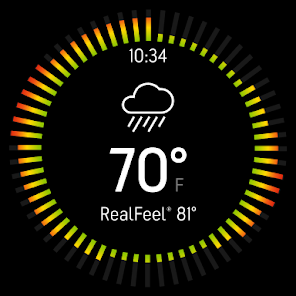
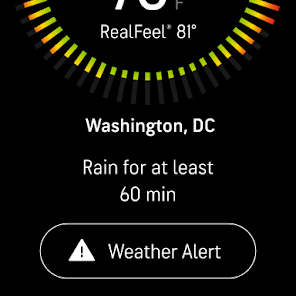
Download AccuWeather®, The Most Trusted Weather App. Get real-time weather alerts and hyperlocal weather updates with proven Superior Accuracy™. Access live radar, weather forecasts, and our severe weather tracker features, helping you make the best decisions and stay more informed. Be best prepared with real-time weather alerts that keep you better informed of winter storms, snow forecasts and cold temperatures. Whether it is tornadoes, snow or ice, flooding rains, mudslides, high winds, extreme heat or cold, polluted air, or any other major weather event, AccuWeather is the best. Unlock WinterCast® and receive hourly snowfall totals, amount probability, maps, total snow accumulation and more to help you stay best prepared for winter weather. AccuWeather’s live radar, and storm warnings, are almost always significantly more accurate, provide greater advance notice, and communicate clearly with more detail and value than all other sources. The award-winning AccuWeather app can be downloaded for free from the Google Play Store and provides proven Superior Accuracy™, severe weather alerts, notifications, and daily weather forecasts with hourly and Minute-by-Minute® weather updates tailored for any location. The app delivers more reliable and more accurate weather forecasts from wind speed to temperature and tracks severe weather with animated radar. Track AccuWeather exclusives, including MinuteCast®, AccuWeather RealFeel® Temperature, AccuWeather Snow Probability Index™, and more in your area. Weather forecasts can be localized to your exact street address. AccuWeather App Features:
Download AccuWeather: Weather Radar
Get the official app from the trusted app stores. You will be redirected to the download page.
When you purchase through links on our site, we may earn an affiliate commission. Learn more
Ratings breakdown
2,580,000 reviewsDeveloper contact
Name
Accuweather, Inc.
Address
385 Science Park Rd State College, PA 16803 United States
Website
https://www.accuweather.comPhone
+1 814-235-8650
Support
support@accuweather.com
Privacy
View policyFrequently Asked Questions
Is this app free? high
Yes, AccuWeather: Weather Radar is free to download and use. It offers in-app purchases, including a Premium Plus subscription that removes ads and provides additional features like extended forecasts.
Source: app_metadata, app_description
What is the content rating of this app? high
The app has an 'Everyone' content rating, meaning it is suitable for all ages.
Source: app_metadata
Does the app have ads? medium
The app contains ads. Based on recent user feedback, some users report seeing a persistent, non-closable ad at the bottom of the screen. An ad-free Premium Plus subscription is available for purchase.
Source: user_reviews, app_description
Is the app still being updated? medium
Yes, recent user reviews from June to September 2025 reference a recent update that significantly changed the app's interface and behavior. However, some users report that this update has caused issues like app freezing and a less intuitive UI.
Source: user_reviews
Can I see the temperature in Celsius or Fahrenheit? low
The app description does not specify, but similar weather apps typically allow toggling between Celsius and Fahrenheit. However, based on recent user feedback, the app has removed the option for 24-hour time format, which may indicate some customization options are limited in the current version.
Source: user_reviews
How to Use
AccuWeather provides real-time weather alerts, hyperlocal forecasts, live radar, and severe weather tracking based on your GPS location. (app_description)
Getting Started
Source: app_description_and_user_feedback_noted
- Step 1: Download the app from Google Play and open it.
- Step 2: Allow the app to access your location for hyperlocal forecasts and weather alerts.
- Step 3: Explore the main screen which displays current conditions, the MinuteCast precipitation forecast, and the air quality index.
- Step 4: Tap the radar icon to view the animated weather radar and track storms.
- Step 5: Check the alerts section for severe weather warnings from AccuWeather meteorologists.
- Step 6: Customize the app by tapping the menu or settings icon. Be aware that some reviews mention customization options are limited in the latest update (e.g., 24-hour time format may not be available).
Key Features (from app listing)
Source: app_description
- MinuteCast: Hyperlocal precipitation forecast for the next 4 hours, pinpointed to your exact street address or GPS.
- RealFeel Temperature: A measure of what the temperature actually feels like, factoring in sun intensity, wind, and humidity.
- RealFeel Shade: Shows the temperature difference between being in the sun and the shade.
- Live Radar & Lightning Network: Real-time storm tracking with lightning proximity monitoring.
- Severe Weather Alerts: Warnings for winter storms, tornadoes, floods, and more.
- AccuLumen Brightness Index: Weather-based brightness characterization for outdoor planning and UV protection.
- 90-Day Daily Forecast: Long-range weather outlook.
- Premium Plus Upgrade: Ad-free experience and more advanced alerts.
Responding to verified user complaint in recent_reviews #1 about app freezing after an update.
How this content was created
Content type: pattern_analysis_of_user_reviews_and_metadata
AI generated: Yes
- Google Play user reviews (5 (below preferred 12-20 minimum) per app), June 22, 2025 to September 18, 2025
- Google Play ratings distribution
- App Store listing metadata
- Review samples are not statistically representative of all user sentiment
- Only 5 recent reviews were analyzed, all skewing negative, which may overrepresent complaints
- No positive or mixed review buckets were available to balance sentiment
- Overall app rating is 3.5 from millions of reviews, but no positive review data was sampled
- Claims labeled 'low confidence' are based on single-review observations only
- No real-world app testing was conducted
- Feature availability may vary by region, device, and app version
Pros & Cons
Based on analysis of Google Play user reviews
Pros
- Highly accurate weather forecasts with Superior Accuracy™ claims.
Theme 'Forecast accuracy' identified in app description and recent_review #0
Evidence (2)
“AccuWeather®, The Most Trusted Weather App. Get real-time weather alerts and hyperlocal weather updates with proven Superior Accuracy™.”Rating: 5★ N/A“I like some aspects of the app but a few other things take away from the app”Rating: 3★ August 28, 2025 217 likes - Exclusive features like MinuteCast® and RealFeel® Temperature.
Theme 'Unique features' identified in app description
Evidence (1)
“Track AccuWeather exclusives, including MinuteCast®, AccuWeather RealFeel® Temperature, AccuWeather Snow Probability Index™”Rating: 5★ N/A - Widely trusted and used by professionals, including aviation.
Theme 'Professional trust' identified in recent_review #1
Evidence (1)
“I've survived more than 40 years, professionally, in aviation by calling things as I see them. In that specialty, I take the choice of weather apps very seriously.”Rating: 2★ August 13, 2025 927 likes
Cons
- Recent update made app freeze on opening and introduced intrusive ads.
Theme 'Update problems' identified in recent_review #0 and #1
Evidence (2)
“I got some update recently, and ever since, it freezes immediately on opening. (Galaxy S23) So, it's unusable a lot of the time”Rating: 1★ September 18, 2025 913 likes“The new format is much less intuitive to navigate. It's nice to have a choice of the light or dark format but neither is easy to read because the font is so small.”Rating: 2★ August 13, 2025 927 likes - Removed useful features like 24-hour time format and reduced favorite cities.
Theme 'Feature removal' identified in recent_review #0 and #2
Evidence (2)
“why do we only get four favorites now?? Please do what Cracker Barrel did and just go back to what works and people like!”Rating: 1★ September 18, 2025 913 likes“For one I prefer 24 hour time format but they totally removed that from their app, only 12 hour format is available no matter what your phone is set to.”Rating: 3★ August 28, 2025 217 likes - Background location updates stopped working, affecting users who rely on it.
Theme 'Location bugs' identified in recent_review #4
Evidence (1)
“This app doesn't stay active in the background and keep my location updated anymore. It used to. I'm a commercial truck driver and rely on that feature to keep me updated on local weather conditions.”Rating: 3★ June 22, 2025 328 likes
Recent Reviews
Kristine Briggs
1★I got some update recently, and ever since, it freezes immediately on opening. (Galaxy S23) So, it's unusable a lot of the time, even after several hard closes and phone restarts. Also, there is an ad that covers the bottom inch of the screen that never goes away and has no option to close. The new format is awful, especially the favorite cities... and why do we only get four favorites now?? Please do what Cracker Barrel did and just go back to what works and people like!
Amazonflyer
2★I've survived more than 40 years, professionally, in aviation by calling things as I see them. In that specialty, I take the choice of weather apps very seriously. The old format met my requirements easily. The new format is much less intuitive to navigate. It's nice to have a choice of the light or dark format but neither is easy to read because the font is so small. They took away some of my favorite locations. In their effort to present more information conveniently they created a mess.
Michael Szubrowski
3★I like some aspects of the app but a few other things take away from the app and it's going I. the wrong direction. For one I prefer 24 hour time format but they totally removed that from their app, only 12 hour format is available no matter what your phone is set to. Also, the minute forecast used to show conditions, now only rain or not. Another step backwards. Widgets also take too much space than needed, more compact options would be great.
Matt Love
3★AccuWeather app gets worse over time. New update is awful. The look is cheap like some other apps and the new color scheme is too much. Not sure what prompted this change but I think I may just have to stick with the stock weather and clock on my phone. Years ago, I paid to update to the ad free premium and that doesn't get you anything anymore except just ad free. All the best options are subscription now.
BLUR33 FACE
3★This app doesn't stay active in the background and keep my location updated anymore. It used to. I'm a commercial truck driver and rely on that feature to keep me updated on local weather conditions. I have the data unrestricted, as well as the battery optimization setting. It is unrestricted as well. So therefore I don't understand why it doesn't stay updated. The location will be stuck on a previous location and I have to force it to manually update.