By App Discoverer Editorial Team · Updated October 1, 2026

Koala Sampler


Overview
Music & Audio
elf audio
Free
Mar 26, 2020
1.4154
8.1
$2.99 - $4.99 per item
No
Mar 13, 2026
Features
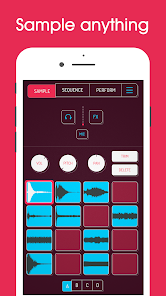
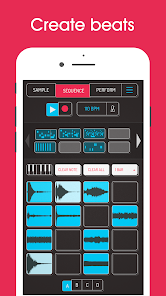
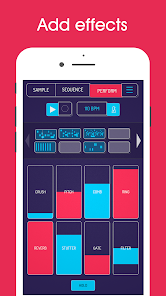
Koala is the ultimate pocket-sized sampler. Record anything with your phone's mic or load your own sounds. Use Koala to create beats with those samples, add effects and create a track!
Koala’s super intuitive interface helps you make a tracks in a flash, there is no brake pedal. You can also resample the output of the app back into the input, through the effects, so the sonic possibilities are endless.
Koala's design focuses totally on making the music making progress instant, keeping you in t...
Koala is the ultimate pocket-sized sampler. Record anything with your phone's mic or load your own sounds. Use Koala to create beats with those samples, add effects and create a track! Koala’s super intuitive interface helps you make a tracks in a flash, there is no brake pedal. You can also resample the output of the app back into the input, through the effects, so the sonic possibilities are endless. Koala's design focuses totally on making the music making progress instant, keeping you in the flow and keeping it fun, not getting bogged down by pages of parameters and micro-editing."Been putting that $4 koala sampler to good use lately. Undeniably great tool that puts some of these expensive beat boxes to shame. A must cop." -
Download Koala Sampler
Get the official app from the trusted app stores. You will be redirected to the download page.
When you purchase through links on our site, we may earn an affiliate commission. Learn more
Ratings breakdown
2,990 reviewsDeveloper contact
Name
MAZBOX LIMITED
Address
ONEGA HOUSE 112 MAIN ROAD SIDCUP DA14 6NE United Kingdom
Website
https://www.koalasampler.comPhone
+44 7450 083758
Support
support@koalasampler.com
Privacy
View policyFrequently Asked Questions
Is Koala Sampler free to download? high
Yes. The app metadata lists Koala Sampler as free, with in-app purchases listed as $2.99 - $4.99 per item.
Source: app_metadata
What do sampled users like about Koala Sampler? medium
Koala Sampler is praised by sampled reviewers for features, customization, or flexibility. 2 sampled reviews or 1 sampling buckets support this theme.
Source: user_reviews
How to Use
Koala is the ultimate pocket-sized sampler. (app_description)
Getting Started
Source: app_description_and_user_feedback_noted
- Install Koala Sampler from the appropriate app store.
- Open the app and start with the free experience.
- Review the main features described in the app listing.
- Adjust app settings based on your preferences.
Key Features (from app listing)
Source: app_description
- Record up to 64 different samples with your mic
- Transform your voice or any other sound with 16 superb built-in fx
- Resample the output of the app back into a new sample
- Export loops or entire tracks as professional quality WAV files
- Copy/paste or merge sequences just by dragging them
- Create beats with the high-resolution sequencer
Theme 'features, customization, or flexibility' identified in recent_reviews #1, recent_reviews #5. Review #1 praises features, customization, or flexibility. Review #5 praises features, customization, or flexibility.
How this content was created
Content type: pattern_analysis_of_user_reviews_and_metadata
AI generated: Yes
- Google Play user reviews (12-20 preferred; may be smaller if source data is limited per app), January 26, 2023 to July 15, 2024
- Google Play ratings distribution
- App Store listing metadata
- Review samples are not statistically representative of all user sentiment
- High-engagement negative reviews can overrepresent complaints
- Claims labeled 'low confidence' are based on single-review observations only
- No real-world app testing was conducted
- Feature availability may vary by region, device, and app version
Pros & Cons
Based on analysis of Google Play user reviews
Pros
- Users appreciate the app: "Just stumbled on this app a couple weeks ago. Gotta say, it's the best sampler for android you'll ever find! I paid for " medium
Extracted from 3 high-rated user review(s)
Evidence (3)
“Just stumbled on this app a couple weeks ago. Gotta say, it's the best sampler for android you'll ever find! I paid for the full version and paid for all the added features and if they release more fe”Rating: 5★ July 15, 2024 88 likes“Love it! I've been using production software for 20 years and thought this would be a fun sketch pad for ideas to flesh out later. I'm actually exporting finished loops directly from Koala. Really int”Rating: 5★ December 13, 2021 28 likes“when I was younger, I always dreamed of a pocket sized tool like this. I've never had more fun chopping and arranging, even in major DAWS. I've made hip hop, jungle, noise, even punk songs with Koala.”Rating: 5★ November 18, 2025 56 likes - Record up to 64 different samples with your mic medium
Extracted from app description
- Transform your voice or any other sound with 16 superb built-in fx medium
Extracted from app description
- Resample the output of the app back into a new sample medium
Extracted from app description
- Export loops or entire tracks as professional quality WAV files medium
Extracted from app description
Cons
- No significant user complaints identified from sampled reviews low
No negative review patterns detected in recent reviews
Recent Reviews
Chris B.
5★Just stumbled on this app a couple weeks ago. Gotta say, it's the best sampler for android you'll ever find! I paid for the full version and paid for all the added features and if they release more features.....I'll be paying for those too! It's so intuitive I didn't even need a manual. It's so close to replacing my my entire DAW. Endless possibilities. Easy workflow. I can't get over how incredible it is. I've been creating source sounds on my PC and importing them to the app. 10X stars!!!!
David Scott
5★Love it! I've been using production software for 20 years and thought this would be a fun sketch pad for ideas to flesh out later. I'm actually exporting finished loops directly from Koala. Really intuitive and fun. The best sequencer/sampler for mobile devices, hands down. EDIT: After further exploration, I did encounter the bug where some samples from my library do not play. The fix is to restart the app, but it would be nice if this could be patched. Also, one thing that I think the app could use is the ability to retrigger a sample in the MIDI piano roll so that you can make a melody without longer samples overlapping. The ability to switch between making chords and single note lines would make this even more amazing. Still leaving my five stars because the Koala Sampler simple deserves it.
Ray Jenkins
5★when I was younger, I always dreamed of a pocket sized tool like this. I've never had more fun chopping and arranging, even in major DAWS. I've made hip hop, jungle, noise, even punk songs with Koala. It started awesome and only gets better. the one thing I'd really like to highlight is how clean the app is. everything has a nice neat spot without a bunch of menu diving.
Gabriel Gerson
5★Great sampler. Could have saved myself a lot of money on hardware if I had realized how intuitive and easy beatmaking could be on my phone. Once you figure out your little work flow this is a brilliant piece of kit for getting ideas down if they're centered around samples. You can screen record anything you see or hear on the internet, extract the audio, and import it into Koala sampler. In less than 1 minute you can start slicing & dicing. Pay the extra for the full version! Worth every penny!
Arthur Cole
5★I have around 30 premium music studios across Android and iOS. Several are $50+. Koala is so intuitive that I keep going straight for it. It's phenomenal for getting ideas out of your head and archived in some form. It is lacking a few quality of life features. there are workarounds, so it doesn't lack functionality for your goal. If you want a user-friendly instrument + sequencer but don't like the idea of using prebuilt instruments, this is the app you need to get.