By AppHub Editorial Team · Updated August 3, 2026
QR & Barcode Scanner





Overview
Tools
Gamma Play
Free
Mar 13, 2015
No
Feb 3, 2026
Features
QR & Barcode Scanner app is the fastest QR code scanner / bar code scanner out there. QR & Barcode Scanner is an essential QR reader for every Android device.
QR & Barcode Scanner / QR code reader is extremely easy to use; with quick scan built in simply point QR code scanner free app to QR or barcode you want to scan and QR scanner will automatically start scanning and QR scan it. No need to press any buttons, take photos or adjust zoom as barcode reader works automatically.
QR & Barcode Sc...
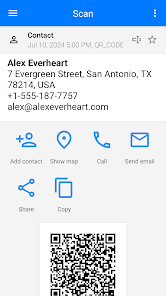
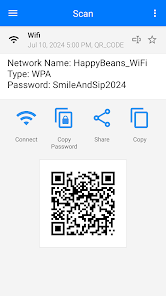
QR & Barcode Scanner app is the fastest QR code scanner / bar code scanner out there. QR & Barcode Scanner is an essential QR reader for every Android device. QR & Barcode Scanner / QR code reader is extremely easy to use; with quick scan built in simply point QR code scanner free app to QR or barcode you want to scan and QR scanner will automatically start scanning and QR scan it. No need to press any buttons, take photos or adjust zoom as barcode reader works automatically. QR & Barcode Scanner can scan and read all QR codes / barcode types including text, url, ISBN, product, contact, calendar, email, location, Wi-Fi and many more formats. After scan and automatic decoding user is provided with only the relevant options for individual QR (qu r code) or Barcode type and can take appropriate action. You can even use QR & Barcode Scanner to scan coupons / coupon codes to receive discounts and save some money. QR code scanner for Android, barcode scanner app is also QR code generator in your pocket. Using QR generator is extremely easy to use, simply enter the data you wish on QR code and click to generate QR codes. QR codes are everywhere! Install qrcode reader app to scan QR code or to scan barcode on the go. Barcode & QR Scanner app is the only free qr code scanner app you will ever need. Turn on the flashlight for scanning in the dark or use pinch to zoom to scan QRs far away. With barcode reader app you can also scan product barcodes. Scan with bar code reader in shops and compare prices with online prices to save money. QR & Barcode Scanner app is the only free QR code reader / barcode scanner you will ever need. Other functionality of QR code reader / QR code scanner: Create QR, Scan QR from image, Scan QR from Gallery, Share your contact info via QR, share images to scan from other apps, generate QR codes from clipboard content, change color, theme of the app, use dark mode, use Batch scan mode to scan multiple QR codes at once, export as . csv . txt, import . csv, add to Favorities, easy share... You can also use QR code scanner for wifi password QRs. Introducing the ultimate all-in-one QR and Barcode scanning solution, designed for seamless integration with your Android device. This QR Scanner App is not just a QR Code Scanner; it's a comprehensive tool that lets you effortlessly scan QR codes and barcodes anytime, anywhere. With its dual functionality, you can also generate your own QR codes, making it a versatile tool for both personal and professional use. This intuitive Barcode Scanner App streamlines the process of reading any barcode, offering quick and accurate results. Whether you're scanning a QR code or a barcode, our advanced technology ensures a smooth, hassle-free experience. This QR Code Scanner Free app offers top-notch features without any cost, making it accessible for all Android users. The Barcode Scanner Free feature is a testament to our commitment to providing high-quality services at no extra charge. For those looking for an efficient QR Reader App, this application offers unmatched speed and reliability. Similarly, as a Barcode Reader App, it stands out for its precision and user-friendly interface. This QR Code Scanner for Android is tailored to meet the needs of Android users, offering seamless integration with your device's capabilities. Likewise, the Barcode Scanner for Android is optimized for the Android platform, ensuring smooth operation and compatibility. This QR code scanner for wifi password also specializes in scanning WiFi QR codes, seamlessly connecting you to wireless networks without the need to enter passwords manually. For Android enthusiasts seeking a reliable QR Reader Android app, this application offers the perfect blend of speed and accuracy. The Barcode Reader Android functionality further enhances its appeal, making it a must-have tool for every Android user.
Download QR & Barcode Scanner
Get the official app from the trusted app stores. You will be redirected to the download page.
When you purchase through links on our site, we may earn an affiliate commission. Learn more
Ratings breakdown
4,320,000 reviewsDeveloper contact
Name
Gamma Play Limited
Address
Rm 1203 12/F China Hong Kong City Twr 3 33 Canton Rd 尖沙咀 Hong Kong
Website
http://www.gammaplay.com/Phone
+852 8177 7608
Support
gammaplay.com@gmail.com
Privacy
View policyFrequently Asked Questions
Does this QR scanner app have a lot of ads? high
Yes, user reviews indicate that the app displays intrusive ads that are designed to look like scan results. Multiple users have reported that clicking these ads has led to unexpected redirects and fraudulent charges.
Source: user_reviews
Is QR & Barcode Scanner free to download? high
Yes, the app is free to download with no listed price, and it does not state any in-app purchases in the store listing.
Source: app_metadata
Can I use this scanner to connect to Wi-Fi via QR code? low
The app description claims it can scan WiFi QR codes to connect to networks automatically without entering a password. However, user reviews do not confirm this feature working correctly and highlight significant ad-related issues.
Source: app_metadata, user_reviews
How to Use
Point the QR & Barcode Scanner camera at any QR code or barcode to automatically scan and decode the information. (app_description)
Getting Started
Source: app_description_and_user_feedback_noted
- Step 1: Download and install the free QR & Barcode Scanner app from the Google Play Store.
- Step 2: Open the app and grant camera permission when prompted.
- Step 3: Point the camera at a QR code or barcode. The app claims to automatically scan without pressing any buttons.
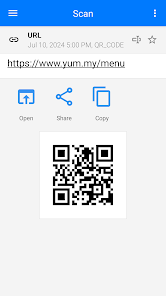
- Step 4: After scanning, the app will display the decoded content as well as ads. To avoid accidentally clicking an ad, carefully identify the actual scan result (often a smaller link at the top of the screen) and select it instead of the larger ad button.
Key Features (from app listing)
Source: app_description
- Automatic scan without pressing buttons
- Supports QR codes and all barcode types (text, URL, ISBN, product, contact, etc.)
- Built-in QR code generator
- Batch scan mode for scanning multiple QR codes at once
- Scan from image or gallery
- Dark mode
- Export and import scan history as .csv or .txt
This tip is derived directly from the workaround provided in a high-engagement positive review (recent_review #2) and mirrored by complaints in negative reviews about the deceptive ad placement.
How this content was created
Content type: pattern_analysis_of_user_reviews_and_metadata
AI generated: Yes
- Google Play user reviews (5 (limited to available recent_reviews) per app), September 26, 2023 – March 06, 2026
- Google Play ratings distribution
- App Store listing metadata
- Review samples are not statistically representative of all user sentiment
- Only the recent_reviews bucket was available; no high-engagement negative, positive, or mixed reviews were provided
- Claims labeled 'low confidence' are based on single-review observations only
- No real-world app testing was conducted
- Feature availability may vary by region, device, and app version
- Ratings distribution was null, so average rating information could not be used as context
Pros & Cons
Based on analysis of Google Play user reviews
Pros
- The app scans QR codes and barcodes automatically without needing to press any buttons.
Theme 'Automatic scanning' identified in app description and recent_review #2
Evidence (2)
“simply point QR code scanner free app to QR or barcode you want to scan and QR scanner will automatically start scanning and QR scan it. No need to press any buttons”Rating: 5★ N/A“Great App. Scans with lightening speed.”Rating: 5★ May 04, 2025 5,323 likes - The app can generate QR codes from user-entered data, functioning as a QR code generator.
Theme 'QR code generation' identified in app description
Evidence (1)
“QR code scanner for Android, barcode scanner app is also QR code generator in your pocket. Using QR generator is extremely easy to use, simply enter the data you wish on QR code and click to generate QR codes.”Rating: 5★ N/A - The app includes a flashlight feature for scanning QR codes in dark environments.
Theme 'Flashlight for scanning' identified in app description
Evidence (1)
“Turn on the flashlight for scanning in the dark or use pinch to zoom to scan QRs far away.”Rating: 5★ N/A
Cons
- The app displays ads that are deceptively placed to mimic the scanned URL, tricking users into clicking them.
Theme 'Deceptive ad placement' identified in recent_review #2, #3, #4, #5
Evidence (4)
“it prominently showed an ad in the middle and choosing Continue at the bottom would have taken me to the ad.”Rating: 5★ May 04, 2025 5,323 likes“When scanning a QR code, an ad will come up in middle of screen. I didn't realize this was an ad so I clicked on Open and put in my credit card to pay for parking. Well, turns out it was not the parking site I was on.”Rating: 1★ May 10, 2025 591 likes“When I scanned a QR, it brought up two links. One link with a big blue button that was actually an ad. The other link which was the one I wanted, was much more inconspicuous.”Rating: 1★ September 26, 2023 1,270 likes“the App plaves it's ads in a way that causes you to mistakenly click them, which lead to me having to replace my debit card.”Rating: 1★ March 13, 2025 501 likes - Clicking on ads in the app can lead to fraudulent websites that steal credit card information.
Theme 'Fraudulent ads' identified in recent_review #3, #4
Evidence (2)
“it was a fraudulent company that charged my credit card on 2 separate occasions days apart and my bank notified me and I had to cancel credit card.”Rating: 1★ May 10, 2025 591 likes“I accidentally opened the ad link thinking it was to pay for parking. I foolishly filled out the form and entered my credit card info. Now, my bank account has been hacked because the link is a scam site.”Rating: 1★ September 26, 2023 1,270 likes - The app primarily functions as a redirect tool to other apps like security suites and VPNs, rather than a standalone scanner.
Theme 'Redirect app' identified in recent_review #1, #5
Evidence (2)
“realized it was nothing more than a redirect app to numerous other apps, most of which were some type of security suite, VPNs, Virus Scanners, etc.”Rating: 1★ March 06, 2026 26 likes“First thing this garbage does after installing is open up an ad. Not a blank page or even a search engine page, but an ad that opens another app.”Rating: 1★ March 11, 2026 5 likes
Recent Reviews
Terry Pope
1★Thought this app was great at the start, then realized it was nothing more than a redirect app to numerous other apps, most of which were some type of security suite, VPNs, Virus Scanners, etc. Lots of other options which all look the same or similar. Walk Away! Ratings don't tell the whole story. I would have recommended the app just after I got it. But somewhere down the trail, the developers must have grown some greed and sold out to "redirects" who pay them a commission for the redirects.
Raj
5★I just downloaded this app. Initially I had a negative reaction when I scanned a QR code. it prominently showed an ad in the middle and choosing Continue at the bottom would have taken me to the ad. Solutions: First, simply look at the top of your screen and choose the displayed URL you just scanned. This takes you to where you want to be. Second, in Settings, select "automatically open the scanned URL." Next time, it will go straight to the scanned URL. Great App. Scans with lightening speed.
Vanessa Watson
1★When scanning a QR code, an ad will come up in middle of screen. I didn't realize this was an ad so I clicked on Open and put in my credit card to pay for parking. Well, turns out it was not the parking site I was on. it was a fraudulent company that charged my credit card on 2 separate occasions days apart and my bank notified me and I had to cancel credit card. Stop letting fraudulent companies advertise on your app!!
Bender Rodriguez
1★Similar complaint as other users have said. When I scanned a QR, it brought up two links. One link with a big blue button that was actually an ad. The other link which was the one I wanted, was much more inconspicuous. I was in a rush trying to pay for parking. I accidentally opened the ad link thinking it was to pay for parking. I foolishly filled out the form and entered my credit card info. Now, my bank account has been hacked because the link is a scam site. 1 star for hosting a scam.
IP-Man
1★Like many others have stated, the App plaves it's ads in a way that causes you to mistakenly click them, which lead to me having to replace my debit card. And for the likely reply I'll get to tgis no it's not because of the QR Code I scanned and yes your app is free and having ads isn't a bad thing but put them at the very top of the app not dead center with a huge blue "Open" button. Seriously, that's uncalled for. Also, before it's said no, I did not confuse this app for another one.