By App Discoverer Editorial Team · Updated October 1, 2026
Mobile Scanner App - Scan PDF



Overview
Productivity
Glority Global Group Ltd.
Free
Dec 27, 2019
2.13.1
9
$0.99 - $39.99 per item
No
Dec 24, 2025
Features
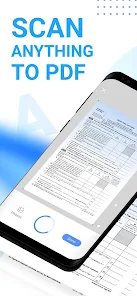
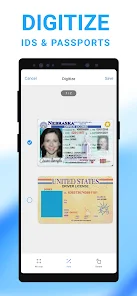
Mobile Scanner is a free-to-download and all-in-one scanner app. Scan any documents, paper notes, photos, receipts, and books into clear PDFs and pictures. Convert images into text with OCR technology and export searchable PDF files. Get the Mobile Scanner app now and turn your phone into a powerful digital office.
Ultra-fast Scanning
Mobile Scanner is a free-to-download and all-in-one scanner app. Scan any documents, paper notes, photos, receipts, and books into clear PDFs and pictures. Convert images into text with OCR technology and export searchable PDF files. Get the Mobile Scanner app now and turn your phone into a powerful digital office. Ultra-fast Scanning
Download Mobile Scanner App - Scan PDF
Get the official app from the trusted app stores. You will be redirected to the download page.
When you purchase through links on our site, we may earn an affiliate commission. Learn more
Ratings breakdown
103,000 reviewsDeveloper contact
Name
Glority Global Group Limited
Address
11/F CAPITAL CTR 151 GLOUCESTER RD 灣仔 Hong Kong
Website
http://www.mobilescanner.com/Phone
+852 5693 2660
Support
support@mobilescanner.com
Privacy
View policyFrequently Asked Questions
Is Mobile Scanner App - Scan PDF free to use? high
The app is free to download, but exporting files or unlocking full OCR features requires a subscription. Users report that after a free trial (3, 7, or unspecified days), they are automatically charged for a plan (e.g., $6.99/week or $39.99/year), and cancellation can be difficult. Many reviews complain about unexpected charges.
Source: app_metadata, user_reviews
Does Mobile Scanner have OCR text recognition? high
Yes, the app includes built-in OCR technology that can recognize and extract text from scanned images, allowing you to export searchable PDFs or TXT files. This is stated in the app description.
Source: app_metadata
How do I cancel my subscription? high
Multiple reviewers report difficulty canceling. You must email support at support@mobilescanner.com and wait up to 24 hours for assistance. The app does not provide an in-app cancellation option, and some users claim there is a 'glitch' preventing cancellation. You should cancel at least 24 hours before the free trial ends to avoid being charged.
Source: user_reviews, app_metadata
Can I export scanned documents to PDF or Word? high
Yes, the app allows scanning documents, photos, receipts, and books, and exporting them as PDF, Word, or JPEG files. Batch scanning into a single PDF is also supported. However, exporting many files or using OCR may require a paid subscription.
Source: app_metadata, user_reviews
Is Mobile Scanner safe to use for sensitive documents? low
The app advertises password protection for documents and folders. However, one reviewer (2022) warns that the privacy policy may grant the company rights to use scanned content. Users should review the privacy policy carefully. No other safety concerns were raised in the sample.
Source: app_metadata, user_reviews
How to Use
Mobile Scanner is a free-to-download app that turns your phone into a digital scanner for documents, receipts, and photos, offering OCR text extraction and PDF/JPEG export. (app_description)
Getting Started
Source: app_description_and_user_feedback_noted
- Download and install the app from the Google Play Store.
- Open the app and grant camera and storage permissions when prompted.
- Tap the scan button to capture a document, receipt, or photo.
- Use automatic border detection and cropping to optimize the image, then adjust color, rotate, or resize as needed.
- Save or export the scan as PDF or JPEG. Note: exporting multiple files or using OCR may require a paid subscription—be mindful of free trial terms.
- To avoid unexpected charges, cancel any subscription before the free trial ends by emailing support@mobilescanner.com and requesting cancellation.
Key Features (from app listing)
Source: app_description
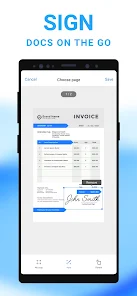
- Ultra-fast scanning: scans documents, receipts, notes, business cards, contracts, fax papers, and books
- Batch scanning: scan multiple pages and save as one PDF
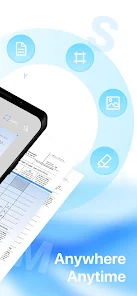
- Smart image optimizing: auto border detection, cropping, color adjustment, and imperfection removal (stains, creases, handwriting)
- OCR text extraction: recognize and edit text from scans, export as TXT or searchable PDF
- Organize files with custom folders and drag-and-drop reordering
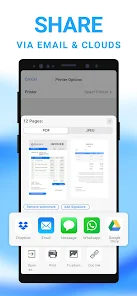
- Share via email, print directly, or upload to Dropbox, Google Drive, and OneDrive
- Password protection for confidential documents and folders
Derived from user complaints about unexpected charges and difficulty canceling. Reviewers 1, 3, and 4 specifically mention being charged after the trial period. Reviewer 3 notes the need to unsubscribe 24 hours before the trial ends. Reviewer 4 mentions a glitch preventing in-app cancellation. This tip directly addresses the most common complaint in the sample.
How this content was created
Content type: pattern_analysis_of_user_reviews_and_metadata
AI generated: Yes
- Google Play user reviews (12-20 preferred; may be smaller if source data is limited per app), Date range of available reviews: August 2020 to October 2025
- Google Play ratings distribution
- App Store listing metadata
- Review samples are not statistically representative of all user sentiment
- High-engagement negative reviews can overrepresent complaints
- Claims labeled 'low confidence' are based on single-review observations only
- No real-world app testing was conducted
- Feature availability may vary by region, device, and app version
- Only 5 reviews from the recent_reviews bucket were available; no positive, high-engagement negative, or mixed reviews were provided. Findings are biased toward recent negative experiences and may not reflect typical app usage.
Pros & Cons
Based on analysis of Google Play user reviews
Pros
- Provides a free trial period to test the app before committing to a subscription.
Theme 'Free trial offered' identified in recent_review #3 and #4
Evidence (2)
“You must unsubscribe 24 hours prior to the 3 free day trial ending or your charged 39.99.”Rating: 1★ August 08, 2020 223 likes“They offer 7 day trial but then automatically enroll you and bill you for their plan.”Rating: 1★ February 28, 2022 1,135 likes - Offers OCR technology to convert scanned images into editable text.
Theme 'OCR feature' identified in app description
Evidence (1)
“Convert images into text with OCR technology and export searchable PDF files.”Rating: 5★ N/A - Allows batch scanning to save multiple documents as a single PDF.
Theme 'Batch scanning' identified in app description
Evidence (1)
“Batch scanning - scan as many as you like and save the files as one PDF.”Rating: 5★ N/A
Cons
- Aggressive subscription model with automatic billing after trial, leading to unwanted charges.
Theme 'Unwanted charges after trial' identified in recent_review #1, #3, #4, and #5
Evidence (4)
“I canceled my subscription but was charged for a second year anyway. THEY NEVER DID REFUND ME.”Rating: 1★ October 13, 2025 247 likes“You must unsubscribe 24 hours prior to the 3 free day trial ending or your charged 39.99.”Rating: 1★ August 08, 2020 223 likes“They offer 7 day trial but then automatically enroll you and bill you for their plan.”Rating: 1★ February 28, 2022 1,135 likes“I think when you download the documents, it charges. I asked for a reimbursement but was told it doesn't meet the reimbursement policy.”Rating: 1★ May 28, 2024 126 likes - High subscription cost ($6.99/week or $39.99/year) is not justified by the app's quality.
Theme 'High subscription cost' identified in recent_review #2 and #3
Evidence (2)
“I haven't the foggiest WHY you thought it was a bright idea to make people pay $6.99 a week”Rating: 1★ May 29, 2025 66 likes“You must unsubscribe 24 hours prior to the 3 free day trial ending or your charged 39.99.”Rating: 1★ August 08, 2020 223 likes - Poor customer service and refund policy, making it difficult to get money back.
Theme 'Poor customer service' identified in recent_review #1 and #5
Evidence (2)
“I canceled my subscription but was charged for a second year anyway. THEY NEVER DID REFUND ME.”Rating: 1★ October 13, 2025 247 likes“I asked for a reimbursement but was told it doesn't meet the reimbursement policy.”Rating: 1★ May 28, 2024 126 likes
Recent Reviews
Robert Ricci
1★I do not recommend purchasing this application. To begin with, it is a subscription. I canceled my subscription but was charged for a second year anyway. THEY NEVER DID REFUND ME. I guess I am going to have to contact the Better Business Bureau regarding this matter. It also has programmatic issues in that the developer puts the captured file somewhere on your phone where you can't find it instead of in the customary Documents folder. Kind of hard to attach it to an email when you can't find it.
Tyler Huffman
1★Congratulations. This is the third 'free' scanning app I've downloaded and uninstalled in as many minutes. I haven't the foggiest WHY you thought it was a bright idea to make people pay $6.99 a week in order to export anything more than one single photo, but I certainly hope that it works out for you. This is, until I find the next supposedly free scanning app, the one that I loath most of all of them.
Kelly Rankin
1★I did like the scanner, but they try to trick you into charging you past the free trial by not telling you how to unsubscribe. You must unsubscribe 24 hours prior to the 3 free day trial ending or your charged 39.99. In order to find out how to in subscribe I had to email them and wait 24 hours to find out. (Definitely not ok). SO for those of you who are like me and didn't know, go into your google play store and click the left top drop down, select manage subscriptions and cancel there!
Kristi Byfield
1★They offer 7 day trial but then automatically enroll you and bill you for their plan. Unable to cancel bc there is a glitch conveniently on their side when you go to cancel. Also Read their privacy info. They have the right to use everything you scan as if the property belongs to them. Great app. Easy to use. But read the fine print and watch your billing. Also they run ads between single page scans so be ready to wait 30+seconds each time.
Maria
1★Beware. If you're in need of a scanner, make sure you avoid this one. For some reason, it offers a 7 day free trial but charges for the year when using it. I noticed the documents were black and white, causing a glare on the documents. So, I canceled within seconds since it was not good. Then, I realized the charge. I had let my teen use the app. But I think when you download the documents, it charges. I asked for a reimbursement but was told it doesn't meet the reimbursement policy.