By AppHub Editorial Team · Updated August 3, 2026
Files by Google
Overview
Tools
Google LLC
Free
Dec 1, 2017
1.11051.902106514.0-release
8.0
No
Apr 27, 2026
Features
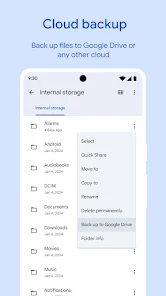
✨ Free up space on your device with cleaning recommendations 🔍 Find files faster with search and simple browsing ↔️ Quickly share files offline with Quick Share ☁️ Back up files to the cloud to save space on your device 🔒 Secure your files with a non-device lock
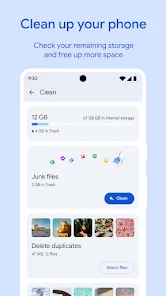
Free up space Easily see how much space is left on your device, SD card and USB drive. Free up space by finding old photos from chat apps, duplicate files, clearing cache, and more.
Find files faster Save time looking for photos, video...
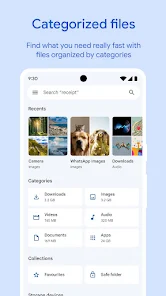
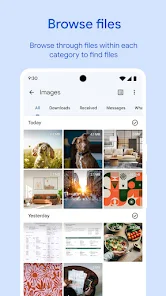
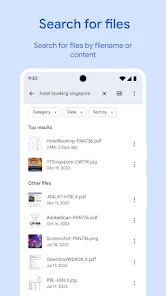
✨ Free up space on your device with cleaning recommendations🔍 Find files faster with search and simple browsing↔️ Quickly share files offline with Quick Share☁️ Back up files to the cloud to save space on your device🔒 Secure your files with a non-device lockFree up spaceEasily see how much space is left on your device, SD card and USB drive. Free up space by finding old photos from chat apps, duplicate files, clearing cache, and more. Find files fasterSave time looking for photos, videos, and documents on your phone. Search quickly or browse your GIFs or share that video you downloaded recently. Sort files by size to understand what’s taking up space. Fast & secure file sharingShare photos, videos, apps, and more to Android and Chromebook devices around you with Quick Share. Files transfer quickly, with speeds up to 480 Mbps, even without an internet connection. Transfers are private and secured with end-to-end encryption. Secure your filesKeep your sensitive files safe with a PIN or pattern that can be different from your device lock. Play offline mediaListen to your music or watch your videos with advanced controls like playback speed, shuffle, and more. Back up filesMove your files to Google Drive or an SD card to save space on your device. You can also share to other cloud storage apps on your device. Get smart recommendationsGet helpful suggestions to save space, protect your device, and more. Your recommendations get smarter the more you use the app. It’s efficient and effectiveThe Files by Google app uses less than 20 MB of storage on your device, it’s easy to use, and has no ads.
Download Files by Google
Get the official app from the trusted app stores. You will be redirected to the download page.
When you purchase through links on our site, we may earn an affiliate commission. Learn more
Ratings breakdown
8,870,000 reviewsDeveloper contact
Name
Google LLC
Address
1600 Amphitheatre Pkwy Mountain View, CA 94043 United States
Website
http://filesgo.google.com/Phone
+1 650-253-0000
Support
files-feedback@google.com
Privacy
View policyFrequently Asked Questions
Is Files by Google free to download? high
Yes. The app metadata lists Files by Google as free.
Source: app_metadata
What do sampled users like about Files by Google? low
Files by Google is praised by sampled reviewers as easy to use, convenient, or genuinely useful. Only 1 sampled review supports this theme, so confidence is low.
Source: user_reviews
Is Files by Google worth downloading in 2026? medium
Based on 5 sampled reviews spanning February 22, 2026 to April 29, 2026, Files by Google has a 4.5/5 overall rating from 8.9M total reviews. Sampled reviews show 1 praised themes and 0 complaint themes. As with any app, experiences vary by device and use case.
Source: user_reviews, app_metadata, ratings_data
How to Use
✨ Free up space on your device with cleaning recommendations🔍 Find files faster with search and simple browsing↔️ Quickly share files offline with Quick Share☁️ Back up files to the cloud to save spa (app_description)
Getting Started
Source: app_description_and_user_feedback_noted
- Install Files by Google from the Google Play Store or Apple App Store.
- Open the app and begin with the free experience to explore its core functionality.
- Review the main features described in the app listing to understand what this app offers.
- Configure app settings based on your preferences.
Key Features (from app listing)
Source: app_description
- Tools app experience
- Free download
- From Google LLC
- 5,000,000,000+ downloads listed
Theme 'ease of use, convenience, or usefulness' identified in recent_reviews #1. Review #1 (recent_reviews, 4★) mentions ease of use, convenience, or usefulness.
How this content was created
Content type: pattern_analysis_of_user_reviews_and_metadata
AI generated: Yes
- Google Play user reviews (12-20 preferred; may be smaller if source data is limited per app), February 22, 2026 to April 29, 2026
- Google Play ratings distribution
- App Store listing metadata
- Review samples are not statistically representative of all user sentiment
- High-engagement negative reviews can overrepresent complaints
- Claims labeled 'low confidence' are based on single-review observations only
- No real-world app testing was conducted
- Feature availability may vary by region, device, and app version
Pros & Cons
Based on analysis of Google Play user reviews
Pros
- Easy-to-understand layout and simple file management interface
Theme 'User-friendly interface' identified in recent_review #1 and #2
Evidence (2)
“I find the layout of Googles Files app easy to understand & mostly simple to work with.”Rating: 4★ April 29, 2026 1 likes“The convenience of being able to view almost everything stored locally in one app is the best part of the app. It helps with organizing and keeping my storage well maintained.”Rating: 5★ April 24, 2026 3 likes - Central hub for viewing and managing all local files, including storage maintenance
Theme 'Central file management' identified in recent_review #2 and #3
Evidence (2)
“The convenience of being able to view almost everything stored locally in one app is the best part of the app. It helps with organizing and keeping my storage well maintained.”Rating: 5★ April 24, 2026 3 likes“I've gotten rid of my other file managers as this one is near perfect.”Rating: 4★ April 28, 2026 2 likes - Quick file search and sorting by size to understand storage usage
Theme 'Search and sorting' identified in app description
Evidence (1)
“Search quickly or browse your GIFs or share that video you downloaded recently. Sort files by size to understand what’s taking up space.”Rating: 5★ N/A
Cons
- Cannot search for files stored in Google Drive through the app
Theme 'No Drive search' identified in recent_review #3
Evidence (1)
“I cannot search through the app to find Drive files. I mean why let us connect to drive if the search box cannot find files in drive.”Rating: 4★ April 28, 2026 2 likes - Poor file sorting for single-digit filenames, requiring leading zeros
Theme 'File sorting bug' identified in recent_review #4
Evidence (1)
“Files can't recognize SINGLE DIGITS FILE NAMES, you have to put zeros in front of them to be sorted! E.g. You get 1 10 11, 2, 21, 22 if you name files that way, work only with zeroes 01, 02, 10, 11, 21.”Rating: 2★ March 01, 2026 26 likes - Overly opinionated recommendations and locked-down permissions limit control
Theme 'Restrictive and opinionated design' identified in recent_review #5
Evidence (1)
“I don't want or need a a file manager that recommends, or guesses, or tries to figure out what I am using the app for! I want a simple list of folder's that I can pick and open to see what's inside. This app is so locked down, no useful permissions, that it is a huge waist of my time!!!”Rating: 1★ February 22, 2026 84 likes
Recent Reviews
Therisa
4★I find the layout of Googles Files app easy to understand & mostly simple to work with. There have been a few instances when I was attempting to transfer/move files from the internal storage to the SD storage. Not sure what or where in the process I may have errored. so I closed the app for the time being & came back later & it worked fine.
Mika A.
5★The convenience of being able to view almost everything stored locally in one app is the best part of the app. It helps with organizing and keeping my storage well maintained. It also make finding things, like docs or recently used or updated files very quick. I feel it's the main hub of my Mobile. I haven't used any other file managers on my mobile, but that's because i haven't seen the need. If it's not broken don't fix it right? Until someone develops a stable Linux based mobile OS I'm good.
A Google user
4★I've gotten rid of my other file managers as this one is near perfect. It's not 5 stars because I cannot search through the app to find Drive files. I mean why let us connect to drive if the search box cannot find files in drive. I also wish (in my pixel) I was able to use the app drawer search bar to find files that are managed with my files app? I think we were able too before but for some reason it was removed. Good app but needs better integration with Android and Google Drive.
Tony Li
2★I was needing to transfer a lot of slides in the fronts of .png. Google drive doesn't have the option to download full folders, so now I have to manually download all the slides png and re-organize them in Files app. That's already enough to make it a very lengthy and tedious process. BUT NOW, Files can't recognize SINGLE DIGITS FILE NAMES, you have to put zeros in front of them to be sorted! E.g. You get 1 10 11, 2, 21, 22 if you name files that way, work only with zeroes 01, 02, 10, 11, 21.
Don Coolman
1★a terrible file manager, it's so bad!!!! ok... I don't want or need a a file manager that recommends, or guesses, or tries to figure out what I am using the app for! I want a simple list of folder's that I can pick and open to see what's inside. This app is so locked down, no useful permissions, that it is a huge waist of my time!!! And very irritating!! Lastly, and most important, I can't uninstall it completely!!!! This is my phone, I paid for it, THIS IS NOT GOOGLE'S PHONE!!!!!!!!!!!!!!!!!