By AppHub Editorial Team · Updated August 3, 2026

Genius Scan - PDF Scanner







Overview
Business
The Grizzly Labs
Free
Aug 26, 2013
7.36.0
8.0
$0.99 - $39.99 per item
No
Feb 24, 2026
Features
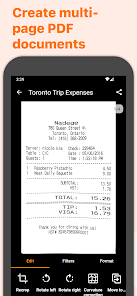
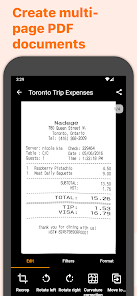
Genius Scan is a scanner app that turns your device into a scanner, lets you quickly scan your paper documents on the go and export them as multi-scan PDF files.
== KEY FEATURES ==
Smart Scanning:
The Genius Scan scanner app includes all the features to make great scans.
...
Genius Scan is a scanner app that turns your device into a scanner, lets you quickly scan your paper documents on the go and export them as multi-scan PDF files.
Download Genius Scan - PDF Scanner
Get the official app from the trusted app stores. You will be redirected to the download page.
When you purchase through links on our site, we may earn an affiliate commission. Learn more
Ratings breakdown
560,000 reviewsDeveloper contact
Name
THE GRIZZLY LABS
Address
39 RUE DE CHATEAUDUN 75009 PARIS France
Website
https://www.thegrizzlylabs.comPhone
+33 9 83 35 60 93
Support
android.support@thegrizzlylabs.com
Privacy
View policyFrequently Asked Questions
Is the OCR (text recognition) included in the free version? high
No. Based on user feedback and the app's description, OCR is a premium feature. A user review states that OCR is not a paid option but is under a subscription, costing $30 per year. The app offers in-app purchases from $0.99 - $39.99 per item, which likely includes this feature.
Source: user_reviews, app_metadata
Is my data safe with Genius Scan? high
The app description highlights a strong focus on privacy and security. It states that document processing is done on-device, and the app offers biometric unlock and PDF encryption. This suggests your data is processed locally and protected.
Source: app_metadata
How much does Genius Scan cost? high
The app is free to download. However, many key premium features like OCR are behind a subscription paywall. A user reports an annual subscription cost of $30 a year. The Google Play listing also shows in-app purchases ranging from $0.99 to $39.99 per item. A user review expressed a desire for a monthly billing option, which is not currently offered.
Source: user_reviews, app_metadata
Can I export my scanned documents to cloud services? high
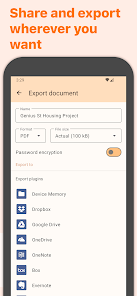
Yes. The app's description explicitly lists several export destinations including Google Drive, Dropbox, Evernote, Box, OneDrive, FTP, and WebDAV. You can also export via email.
Source: app_metadata
Has the app's recent update made it worse? low
A recent user review complains that a recent update made the app more frustrating to use, specifically citing that adding a previously taken photo to a document now requires an extra menu step. This is a single, low-confidence user report based on the recent sample.
Source: user_reviews
How to Use
Genius Scan turns your Android device into a portable scanner for documents, allowing you to capture, edit, organize, and export them as multi-page PDFs. (app_description)
Getting Started
Source: app_description_and_user_feedback_noted
- Step 1: Download and open the Genius Scan app. Point your camera at a document to capture it.
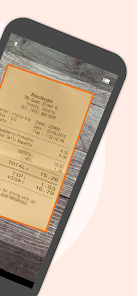
- Step 2: The app will automatically detect the document edges, remove the background, and correct the perspective. You can adjust the crop manually.
- Step 3: After scanning, you can combine multiple scans into a single PDF document. Use the tools to merge, split, or rearrange pages.
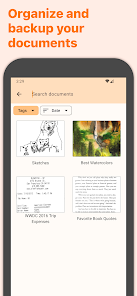
- Step 4: Organize your scans by adding tags, using metadata search, or renaming documents with custom templates. Note that user feedback indicates the organization features can be cumbersome.
- Step 5: Export your finished document via email, or to cloud services like Google Drive, Dropbox, or OneDrive. For OCR (text recognition) and other premium features, you will need to purchase a subscription.
Key Features (from app listing)
Source: app_description
- Smart scanning with automatic document detection, background removal, and distortion correction.
- PDF creation and editing, including document merging, splitting, and multi-page PDFs.
- Privacy-focused with on-device processing, biometric unlock, and PDF encryption.
- Document organization with tagging, metadata search, and smart renaming.
- Export to multiple services: Google Drive, Dropbox, Evernote, Expensify, OneDrive, FTP, and WebDAV.
- OCR (Text Recognition) for extracting text and creating searchable PDFs (premium feature).
This tip is responsive to a verified user complaint from recent_reviews #1, who stated they only need the app 'occasionally' and an 'annual sub doesn't make sense.'
How this content was created
Content type: pattern_analysis_of_user_reviews_and_metadata
AI generated: Yes
- Google Play user reviews (12-20 preferred; may be smaller if source data is limited per app), Date range of available reviews (September 2024 - November 2025)
- Google Play ratings distribution
- App Store listing metadata
- Review samples are not statistically representative of all user sentiment
- Only one sampling bucket (recent_reviews) was available, limiting the sample size and potentially introducing bias.
- Claims labeled 'low confidence' are based on single-review observations only
- No real-world app testing was conducted
- Feature availability may vary by region, device, and app version
Pros & Cons
Based on analysis of Google Play user reviews
Pros
- Produces high-quality scans that look like they came from a flatbed scanner.
Theme 'Excellent scan quality' identified in recent_review #5
Evidence (2)
“You can't tell the document wasn't scanned on a flatbed scanner. It removes minor imperfections and reduces ones that are not so minor.”Rating: 5★ September 07, 2024 140 likes“It's still the most accurate scanner”Rating: 3★ November 03, 2025 14 likes - On-device processing ensures privacy and security of scanned documents.
Theme 'Privacy-focused' identified in app description
Evidence (2)
“On-device document processing”Rating: 5★ N/A“I was installing this after hearing so many good things about it regarding privacy and price.”Rating: 3★ December 24, 2025 3 likes - Offers useful features like document detection, distortion correction, and shadow removal.
Theme 'Smart scanning features' identified in app description
Evidence (1)
“Document detection & background removal, Distortion correction, Shadow removal and defect cleanup”Rating: 5★ N/A
Cons
- Forced annual subscription for premium features is expensive and inflexible.
Theme 'Expensive subscription' identified in recent_review #1
Evidence (2)
“I do not like being forced into an annual subscription if I want the premium features. The paywall is fine, but I'd prefer monthly billing”Rating: 4★ October 01, 2024 169 likes“the price is under subscription and $30 a year. this is too much for just one app”Rating: 3★ December 24, 2025 3 likes - Recent update made scanning and adding photos less intuitive and more cumbersome.
Theme 'UI regression in update' identified in recent_review #2
Evidence (1)
“Used to be able to add scan or photo from the document. Now you have to open a mini menu to do so. Illogical to reduce ease of use, speed, and functionality in one move”Rating: 1★ November 06, 2025 17 likes - Document organization features are poor, making folder management a pain.
Theme 'Poor organization' identified in recent_review #3
Evidence (1)
“it's terrible at organization. Moving documents and folders is a huge pain and makes workflows unpleasant”Rating: 3★ November 03, 2025 14 likes
Recent Reviews
Josh Manning
4★Works very well, but I do not like being forced into an annual subscription if I want the premium features. The paywall is fine, but I'd prefer monthly billing, even at a higher cost. Unlike many, I will need this app only occasionally, so an annual sub doesn't make sense for me. Better still if I could pay once and be done with it, which I understand *used* to be the pricing model. Either way, you'll get no subscription from me. I'll cope with less functionality for the few scans I need.
Marcus Pritchard
1★This app was barely tolerable until a few months ago. Then they rolled out a bad update to make it worse. Frustrating often. Want to add a pic you took yesterday? Used to be able to add scan or photo from the document. Now you have to open a mini menu to do so. Illogical to reduce ease of use, speed, and functionality in one move, but they did. Before the update, it could Scan docs on my brown desk no prob. Now it can't see a white sheet unless I hide it in the dark under the desk.
Star
3★Edit: After using the app for a while I have dropped it down another star. It's still the most accurate scanner, but it's terrible at organization. Moving documents and folders is a huge pain and makes workflows unpleasant l, especially when moving individual scanned documents into other documents (where it doesn't even show the destination document's folder). Folders might as well not exist. I love the scanning and would gladly pay for this app if these issues were fixed, it's such a shame.
Oscar Dicenta
3★I was installing this after hearing so many good things about it regarding privacy and price. I was prepared and willing to pay some money for using it and just after installing it I discovered that the OCR is not a paid option only and that the price is under subscription and $30 a year. this is too much for just one app that I use for personal reasons even if I use it many times a month.
Elita One
5★This is THE document scanner app. I tried so many others.. one couldn't even keep pages in the order in which they were scanned. This one is flawless. You can't tell the document wasn't scanned on a flatbed scanner. It removes minor imperfections and reduces ones that are not so minor. It increases contrast so it's easy to read. I will probably send them some money, just out of gratitude, not because I need premium features. Love this app!!