By AppHub Editorial Team · Updated August 3, 2026
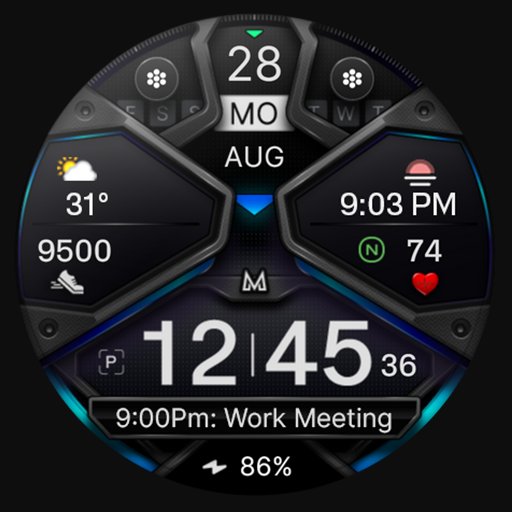
MD326 3D Modern Watch Face


Overview
Personalization
Matteo Dini MD ® Watch Faces
Free
Aug 9, 2023
No
Aug 24, 2025
Features
Note for Galaxy Watch Users: The watch face editor in the Samsung Wearable app often fails to load complex watch faces like this one. This is not an issue with the watch face itself.
It is recommended to customize the watch face directly on the watch until Samsung resolves this issue.
TAP AND HOLD SCREEN ON WATCH AND SELECT CUSTOMIZE.
It contains 3 Preset App shortcuts, 2 customizable shortcuts, 3 customizable complications where you can have the data you prefer like weather, barometer, uv ...
Note for Galaxy Watch Users: The watch face editor in the Samsung Wearable app often fails to load complex watch faces like this one. This is not an issue with the watch face itself. It is recommended to customize the watch face directly on the watch until Samsung resolves this issue. TAP AND HOLD SCREEN ON WATCH AND SELECT CUSTOMIZE. It contains 3 Preset App shortcuts, 2 customizable shortcuts, 3 customizable complications where you can have the data you prefer like weather, barometer, uv index, chanche of rain etc. INSTALLATION NOTES:Please check this link for installation and troubleshooting guide:https://www. matteodinimd. com/watchface-installation/This watch face supports all Wear OS devices with API Level 33+ (Wear OS 4 and later versions) like Samsung Galaxy Watch 4-8, Ultra, Pixel Watch etc. Features:
Download MD326 3D Modern Watch Face
Get the official app from the trusted app stores. You will be redirected to the download page.
When you purchase through links on our site, we may earn an affiliate commission. Learn more
Ratings breakdown
1,320 reviewsDeveloper contact
Name
CANALETTI VANIA
Address
VIA DEGLI ULIVI 31 57014 COLLESALVETTI Italy
Website
https://www.matteodinimd.com/Phone
+39 338 473 7327
Support
support@mdwatchfaces.com
Privacy
View policyFrequently Asked Questions
Is MD326 3D Modern Watch Face free to download? high
Yes. The app metadata lists MD326 3D Modern Watch Face as free.
Source: app_metadata
What do sampled users like about MD326 3D Modern Watch Face? medium
MD326 3D Modern Watch Face is praised by sampled reviewers for features, customization, or flexibility. 2 sampled reviews or 1 sampling buckets support this theme.
Source: user_reviews
How to Use
Note for Galaxy Watch Users: The watch face editor in the Samsung Wearable app often fails to load complex watch faces like this one. (app_description)
Getting Started
Source: app_description_and_user_feedback_noted
- Install MD326 3D Modern Watch Face from the appropriate app store.
- Open the app and start with the free experience.
- Review the main features described in the app listing.
- Adjust app settings based on your preferences.
Key Features (from app listing)
Source: app_description
- Personalization app experience
- Free download
- From Matteo Dini MD ® Watch Faces
- 10,000+ downloads listed
Theme 'features, customization, or flexibility' identified in recent_reviews #1, recent_reviews #5. Review #1 praises features, customization, or flexibility. Review #5 praises features, customization, or flexibility.
How this content was created
Content type: pattern_analysis_of_user_reviews_and_metadata
AI generated: Yes
- Google Play user reviews (12-20 preferred; may be smaller if source data is limited per app), July 05, 2025 to February 11, 2024
- Google Play ratings distribution
- App Store listing metadata
- Review samples are not statistically representative of all user sentiment
- High-engagement negative reviews can overrepresent complaints
- Claims labeled 'low confidence' are based on single-review observations only
- No real-world app testing was conducted
- Feature availability may vary by region, device, and app version
Pros & Cons
Based on analysis of Google Play user reviews
Pros
- Users appreciate the app: "Awesome watch faces! My biggest beef with this developer is I CAN'T DECIDE WHICH ONE I LIKE BEST. I really like these st" medium
Extracted from 3 high-rated user review(s)
Evidence (3)
“Awesome watch faces! My biggest beef with this developer is I CAN'T DECIDE WHICH ONE I LIKE BEST. I really like these styles and get lots of compliments. But most of all the options and customization ”Rating: 5★ February 11, 2024 56 likes“Great watch face. This is the best one you guys have created so far. It looks 3D with great accents and light reflections. My only suggestion is the watch hands need improving. There is only one style”Rating: 5★ August 10, 2025 32 likes“Nice clear watch face. I like that you have the option of adding analog hands to the watch face if you want to. I don't know if it's just my personal preference, but I do prefer the shortcuts being mo”Rating: 5★ August 22, 2023 13 likes - • some features may not be available on some watches. Let's keep in touch: Newsletter: Sign up to stay updated with new watchfaces and promotions! http://eepurl. com/hlRcvfFACEBOOK:https://www. facebook. com/matteodiniwatchfacesINSTAGRAM:https://www. instagram. com/mdwatchfaces/TELEGRAM:https://t. me/mdwatchfacesWEB:https://www. matteodinimd. comThank you. medium
Extracted from app description
Cons
- No significant user complaints identified from sampled reviews low
No negative review patterns detected in recent reviews
Recent Reviews
zeillion
5★Awesome watch faces! My biggest beef with this developer is I CAN'T DECIDE WHICH ONE I LIKE BEST. I really like these styles and get lots of compliments. But most of all the options and customization is my real draw. To be able to see all the pertinent stuff at a glance and have separate buttons for on-call apps really is ideal. I'm a huge fan of colors on black backgrounds and when they look this nice how can you go wrong. Here I go buying another... 🤷😉
Kem Qemal
5★Great watch face. This is the best one you guys have created so far. It looks 3D with great accents and light reflections. My only suggestion is the watch hands need improving. There is only one style of watch hands and they don't have a real watch hand look to them. I turn the hands off and just use the digital time display, that's why I'm still giving it 5 stars.
Roger Kitson
5★Nice clear watch face. I like that you have the option of adding analog hands to the watch face if you want to. I don't know if it's just my personal preference, but I do prefer the shortcuts being monochrome, probably as I go for more muted colour schemes on watch faces - keep it simple.
nick korres
5★Pretty much as advertised, modern look with enough color options. A drawback for me is a relatively small clock number but that's the price of having multiple complications and shortcuts. No real complaints other than when I click the date it opens battery instead of calendar.
Michael Scott II
5★I love the watch face. Tons of information on the screen and it doesn't feel cluttered. Also can read the number of steps and the battery charge easily with my old eyes. Just a hint to those who have trouble changing the settings from the app. When you open the heart app and tap customize wake up the screen on the watch and it will connect everytime. I know that you can long press on the watch itself but I prefer to do it from the app. Developers you can thank me later. 😄