By App Discoverer Editorial Team · Updated October 1, 2026

Weather & Radar - Storm radar









Overview
Weather
WetterOnline
Free
Jul 17, 2012
10
$0.99 - $8.99 per item
No
Feb 26, 2026
Features
Get everything you need to stay weather-ready with your free Weather & Radar app:
🌞 Weather App Be ready for everything with Weather & Radar’s app, with accura...
Get everything you need to stay weather-ready with your free Weather & Radar app:
Download Weather & Radar - Storm radar
Get the official app from the trusted app stores. You will be redirected to the download page.
Official Links
When you purchase through links on our site, we may earn an affiliate commission. Learn more
Ratings breakdown
2,440,000 reviewsData Safety
- This app may share these data types with third parties Location, App activity and 2 others
- This app may collect these data types Location, App activity and 2 others
- Data is encrypted in transit
- Data can’t be deleted
Permissions
- approximate location (network-based)
- precise location (GPS and network-based)
- read phone status and identity
- read the contents of your USB storage
- modify or delete the contents of your USB storage
- read the contents of your USB storage
- modify or delete the contents of your USB storage
- take pictures and videos
- record audio
- view Wi-Fi connections
- read phone status and identity
- view network connections
- full network access
- run at startup
- control vibration
Developer contact
Name
WetterOnline - Meteorologische Dienstleistungen GmbH
Address
Karl-Legien-Str. 194 a 53117 Bonn Germany
Website
http://weatherandradar.com/appsPhone
+49 228 55937990
Support
info@weatherandradar.com
Privacy
View policyFrequently Asked Questions
Is this weather app free? high
Yes, the app is free to download and use, but it contains ads. An in-app purchase (subscription) removes ads and offers additional features. Pricing ranges from $0.99 to $8.99 per item.
Source: app_metadata, user_reviews
Does it work with Android Auto? high
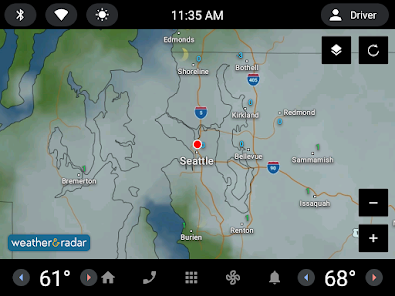
Yes, Weather & Radar is compatible with Android Auto. Reviews indicate it works well for checking radar maps while driving, though some users wish for split-screen support and a compass feature.
Source: app_description, user_reviews, app_metadata
Why does the app have so many ads? high
Multiple recent reviews report excessive ads, including full-screen ads, banner ads, and quarter-page ads. This is a common complaint. A paid subscription removes ads, but users find it expensive. Some users note the same data is available ad-free on the website.
Source: user_reviews
Does the app sell my location data? low
One reviewer claims the app sells user location information to third parties. The app's description mentions personalized notifications and location-based features. We recommend reviewing the app's privacy policy for full details, as this claim is based on a single user review.
Source: user_reviews, app_metadata
Is there a lifetime purchase option? medium
According to a recent reviewer, the app does not offer a lifetime purchase option — it appears to be subscription-only. The subscription pricing is described as expensive by multiple users. Check the latest version of the app for current purchase options.
Source: user_reviews, app_metadata
How to Use
Weather & Radar provides accurate forecasts, real-time radar maps, storm alerts, and Android Auto compatibility, all in a free app with optional subscription. (app_description)
Getting Started
Source: app_description_and_user_feedback_noted
- Step 1: Download and install Weather & Radar from Google Play.
- Step 2: Grant location permission for personalized weather data and alerts.
- Step 3: Explore the main screen for current conditions, hourly/daily forecasts, and radar maps.
- Step 4: Customize the weather widget on your home screen (choose from 4 formats).
- Step 5: For ad-free experience, consider the subscription in-app purchase ($0.99 - $8.99 per item).
- Step 6: Use Android Auto by connecting your phone to your vehicle and launching the app on the car display.
Key Features (from app listing)
Source: app_description
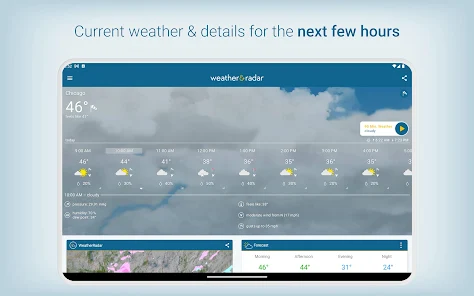
- Accurate hourly and daily weather forecast
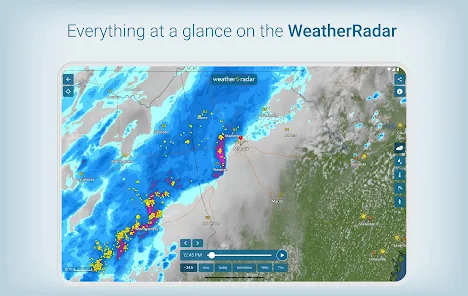
- All-in-one weather maps (rain, snow, wind, lightning radar)
- Android Auto compatibility
- Weather alerts for severe storms, snow, ice, and hurricanes
- Personalized notifications for your location
- Local air quality forecasts (AQI)
- Detailed ski reports
- 14-day forecast trend
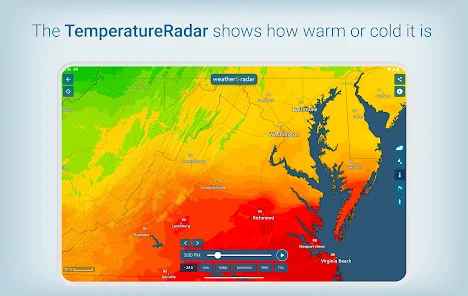
- Coastal conditions (lake/ocean temps, wind, wave, tide)
- 90-minute nowcast
- UV index and air quality info
- Weather widget (4 formats)
Derived from a user review (Review #2) that states 'the same info is on their website (without ads) so why should I pay for the app?' This directly suggests a free ad-free alternative.
How this content was created
Content type: pattern_analysis_of_user_reviews_and_metadata
AI generated: Yes
- Google Play user reviews (5 (fewer than the preferred 12-20 range) per app), August 21, 2024 to January 05, 2026 (one review from 2019 is also included in the recent_reviews bucket)
- Google Play ratings distribution
- App Store listing metadata
- Review samples are not statistically representative of all user sentiment
- Only 5 recent reviews were available — sample is small and may not reflect overall app sentiment
- No high-engagement negative or positive reviews were available to capture extremes
- Claims labeled 'low confidence' are based on single-review observations only
- No real-world app testing was conducted
- Feature availability may vary by region, device, and app version
- The app has a high 4.7 rating from 2.44M reviews, but this rating is not reflected in the available review sample
Pros & Cons
Based on analysis of Google Play user reviews
Pros
- Android Auto compatibility is a valued feature across recent reviews medium
Theme 'positive Android Auto integration' appears in 2 of 5 sampled recent reviews. Review #3 notes good initial experience with sky conditions and map. Review #5 explicitly says Android Auto compatibility is a 'major plus'.
Evidence (2)
“I used the app with Android Auto and it's off to a good start! I was pretty much able to follow the sky conditions and the map provided was OK to drive and follow with route numbers and state lines.”Rating: 3★ February 11, 2024 169 likes“Seems like a decent weather app, and the fact that it works with Android Auto is a major plus.”Rating: 3★ August 21, 2024 156 likes - Comprehensive weather data and content depth are recognized as strengths medium
Theme 'content depth' appears in 2 of 5 recent reviews. Review #1 praises 'terrific' content and depth beyond basic apps. Review #5 calls it a 'decent weather app' with a positive overall tone regarding features.
Evidence (2)
“At first glance the content is terrific and the depth of info is more than your basic weather apps. The layout is logical and the ease of reading and navigating the app is sensible.”Rating: 3★ January 05, 2026 50 likes“Seems like a decent weather app, and the fact that it works with Android Auto is a major plus. The one issue that I have with it is the use of nonstandard colors on the radar map.”Rating: 3★ August 21, 2024 156 likes
Cons
- Excessive and intrusive advertising is a recurring recent concern high
Theme 'overwhelming ads' appears in 3 of 5 recent reviews. Review #1 criticizes 'overload of ads'. Review #4 describes 'full screen ads' plus banner ads, and says ads increased over time. Review #2 mentions 'ads not too bad' but still notes their presence.
Evidence (3)
“It scores poor marks in the overload of ads as well as the selling of my information to 3rd parties about my location.”Rating: 3★ January 05, 2026 50 likes“Full screen ads are a bit much as there's already a quarter page ad plus a banner at the bottom. The subscription pricing is way too high to consider getting the paid version. EDIT: there are now even more ads on the main screen in addition to full page ads and the bottom banner.”Rating: 2★ April 11, 2019 62 likes“Decent. Ads not too bad. Widgets are few and not very good. Since it is subscription based it is very expensive.”Rating: 3★ October 14, 2025 68 likes - Subscription pricing is perceived as too high relative to value medium
Theme 'expensive subscription' appears in 2 of 5 recent reviews. Review #2 calls it 'very expensive' and notes no lifetime option. Review #4 says pricing is 'way too high'. Both suggest the free version with ads is the only viable option.
Evidence (2)
“Decent. Ads not too bad. Widgets are few and not very good. Since it is subscription based it is very expensive. If it had a lifetime purchase option I would buy it. Also, the same info is on their website (without ads) so why should I pay for the app?”Rating: 3★ October 14, 2025 68 likes“Full screen ads are a bit much as there's already a quarter page ad plus a banner at the bottom. The subscription pricing is way too high to consider getting the paid version.”Rating: 2★ April 11, 2019 62 likes
Recent Reviews
Michael Wheeler
3★At first glance the content is terrific and the depth of info is more than your basic weather apps. The layout is logical and the ease of reading and navigating the app is sensible. It scores poor marks in the overload of ads as well as the selling of my information to 3rd parties about my location. It probably is in the fine print somewhere but I received a notification about their access to my info and the selling to 3rd parties is not something I consent to anymore. Uninstalled.
Liberty Toad
3★Decent. Ads not too bad. Widgets are few and not very good. Since it is subscription based it is very expensive. If it had a lifetime purchase option I would buy it. Also, the same info is on their website (without ads) so why should I pay for the app? I just spent $25 lifetime for a different weather. I would rather have bought this one....
Sal Marino
3★I used the app with Android Auto and it's off to a good start! I was pretty much able to follow the sky conditions and the map provided was OK to drive and follow with route numbers and state lines. I couldn't use split screen...that would be nice. Also, a compass would be nice. Good start! I didn't test it fully, but look forward to finding more features.
A Google user
2★Full screen ads are a bit much as there's already a quarter page ad plus a banner at the bottom. The subscription pricing is way too high to consider getting the paid version. EDIT: there are now even more ads on the main screen in addition to full page ads and the bottom banner. I get it, it's a free app & you have to generate revenue with ads, but 8€ for the no-ad "pro" version is just too high. Comes off as greedy, esp when considering the v. aggressive anti ad-blocker strategy on the website
Chris Michaud
3★Seems like a decent weather app, and the fact that it works with Android Auto is a major plus. The one issue that I have with it is the use of nonstandard colors on the radar map. They make things very confusing, especially in the spring and fall, when the possibility of snow/sleet is there. There is overlap in the colors for heavy rain and snow. Which one is it today, a severe rain storm or a severe snow storm? Can't tell because the colors are the same! PLEASE, use standard radar colors!!