By App Discoverer Editorial Team · Updated October 1, 2026

Alarmy - Alarm Clock & Sleep









Overview
Productivity
Sleep Tracker & Alarm Clock by Delightroom
Free
Aug 22, 2012
26.16.0
9
$2.90 - $159.99 per item
No
Apr 3, 2026
Features
Boost your mornings with Alarmy – the most powerful loud alarm clock app for heavy sleepers! Wake up refreshed and motivated every day using our loud alarm clock app, customizable missions, and powerful sounds.
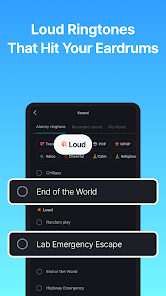
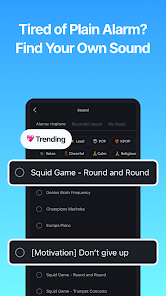
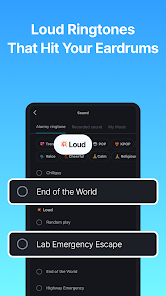
Are you tired of regular alarms not working? Our loud alarm clock app comes with ultra-powerful sounds like “End of the World” and “Cock-a-doodle-doo,” making it perfect for heavy sleepers. No more oversleeping – this app is louder and smarter.
Boost your mornings with Alarmy – the most powerful loud alarm clock app for heavy sleepers! Wake up refreshed and motivated every day using our loud alarm clock app, customizable missions, and powerful sounds.
Download Alarmy - Alarm Clock & Sleep
Get the official app from the trusted app stores. You will be redirected to the download page.
When you purchase through links on our site, we may earn an affiliate commission. Learn more
Ratings breakdown
2,040,000 reviewsDeveloper contact
Name
Delight Room Co., Ltd.
Address
368 Sapyeong-daero Shinnonhyeon Tower 서초구, 서울특별시 06611 South Korea
Website
http://alar.myPhone
+82 10-7516-2497
Support
cs@delightroom.com
Privacy
View policyFrequently Asked Questions
Does Alarmy actually work for heavy sleepers? high
Yes, many user reviews indicate it is highly effective for heavy sleepers and people with ADHD. Users report that the forced missions, like taking a photo or solving math problems, are the only thing that gets them out of bed. This is based on positive recent user feedback.
Source: user_reviews
Is Alarmy having problems with its alarm not ringing? high
Recent user reviews from July 2025 report a critical bug where the alarm simply does not ring. One user stated the app has become 'basically unusable' due to this issue. This appears to be a recent, recurring bug.
Source: user_reviews
Is the paid version of Alarmy reliable? low
One recent user review reports significant issues with the paid version, including losing access to purchased features despite paying twice, which led to being late for work. This is a single report, so the reliability of in-app purchases is uncertain based on this small sample.
Source: user_reviews
What are the in-app purchase prices for Alarmy? high
According to the Google Play listing, Alarmy offers in-app purchases ranging from $2.90 to $159.99 per item.
Source: app_metadata
Is Alarmy free? high
Yes, Alarmy is a free app to download. It offers in-app purchases for additional features. One recent user mentioned successfully using the free version.
Source: app_metadata, user_reviews
How to Use
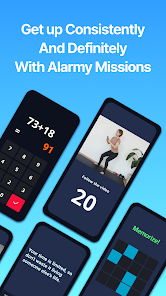
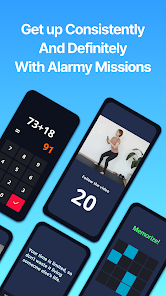
Alarmy is a loud alarm clock app that forces heavy sleepers out of bed using customizable missions like solving math problems, taking a photo, or scanning a barcode. (app_description)
Getting Started
Source: app_description_and_user_feedback_noted
- Step 1: Download and open the Alarmy app.
- Step 2: Set a new alarm by choosing a time and selecting a loud alarm tone like 'End of the World' or a peaceful melody.
- Step 3: Choose a 'Mission' to ensure you wake up. Options include a Math Problem, Photo Mission (take a picture of a preset object), or Barcode Scan.
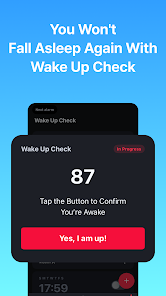
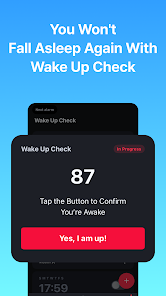
- Step 4: For heavy sleepers, enable 'Wake Up Check' to prevent snoozing. If you ignore it, the mission restarts.
- Step 5: Grant the necessary permissions (e.g., SYSTEM_ALERT_WINDOW for the dismissal screen) when prompted to ensure the alarm functions correctly.
Key Features (from app listing)
Source: app_description
- Ultra-loud alarm sounds for heavy sleepers.
- Smart wake-up missions: Barcode/photo, math, memory games, typing quotes, shake/squat.
- Wake Up Check mode to break the snooze habit.
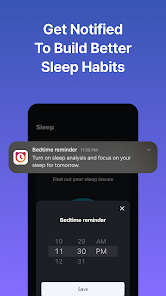
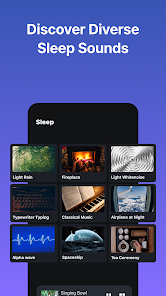
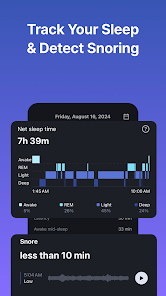
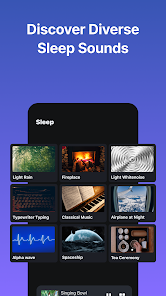
- Sleep tracker and calming sleep sounds (rain, ocean).
This tip is in response to a verified user complaint from recent_review #3 about the alarm not ringing, suggesting a potential reliability issue.
How this content was created
Content type: pattern_analysis_of_user_reviews_and_metadata
AI generated: Yes
- Google Play user reviews (5 per app), November 2024 to November 2025
- Google Play ratings distribution
- App Store listing metadata
- Review samples are not statistically representative of all user sentiment
- Only 5 'recent_reviews' were available; no other sampling buckets were provided, limiting the depth of analysis.
- Claims labeled 'low confidence' are based on single-review observations only
- No real-world app testing was conducted
- Feature availability may vary by region, device, and app version
Pros & Cons
Based on analysis of Google Play user reviews
Pros
- Effective wake-up missions like barcode scanning and photo tasks force users out of bed.
Theme 'Wake-up missions' identified in recent_review #4, #5
Evidence (2)
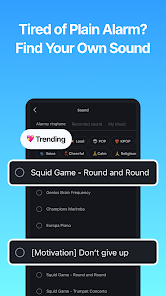
“Now I'm able (or rather forced) to wake up, and only need one alarm.”Rating: 5★ February 22, 2025 389 likes“This is the only alarm that has consistently worked to get me up in the morning!”Rating: 5★ August 07, 2025 491 likes - Customizable alarm sounds including personal songs and fun tones for heavy sleepers.
Theme 'Customizable sounds' identified in recent_review #2
Evidence (1)
“I love the many, many options I have for alarm sounds including my own songs!”Rating: 5★ November 19, 2024 231 likes - Helpful for users with ADHD or heavy sleepers who struggle with traditional alarms.
Theme 'ADHD and heavy sleeper support' identified in recent_review #5
Evidence (1)
“I'm over 30 & ADHD. This is the only alarm that has consistently worked to get me up in the morning!”Rating: 5★ August 07, 2025 491 likes
Cons
- Paid features frequently disappear without warning, requiring repeated payments and support contact.
Theme 'Paid feature loss' identified in recent_review #1
Evidence (1)
“I've paid TWICE, contacted the team now THREE times and keep losing access to paid features over the past year or two.”Rating: 3★ November 07, 2025 76 likes - Alarms sometimes fail to ring or become unresponsive, requiring phone restart to fix.
Theme 'Alarm failures' identified in recent_review #3
Evidence (1)
“Half the time my alarm just won't ring. Recently it's been buggy to where it lags or doesn't let me push me the button to turn the alarm off, but the alarm continues going off incessantly.”Rating: 1★ July 04, 2025 284 likes - Intrusive ads are difficult to dismiss and disrupt the user experience significantly.
Theme 'Intrusive ads' identified in recent_review #3
Evidence (1)
“Plus the ads are horrendous! It takes several tries to get the ads to actually dismiss.”Rating: 1★ July 04, 2025 284 likes
Recent Reviews
Adam Runde
3★Don't bother paying for anything. I've paid TWICE, contacted the team now THREE times and keep losing access to paid features over the past year or two. I came to rely on these features and when they suddenly disappeared without warning, I was late for work. This used to be a great, reliable app, but it has lost all of that and feels much like a scam. Edit: I got it work after some tinkering. I can't rate higher than 3 stars because of the hassle. I fully expect to lose paid features again.
Victoria Last
5★Thank you for this amazing alarm clock!! I love the many, many options I have for alarm sounds including my own songs! Thank you! Update: However, I don't use the timer for one minute any longer because it's not actually one minute. It goes off after about 20 seconds. That's annoying. I also don't like how I have no control over when the alarm goes off and then reminds me 15 times before I get the "Yes I am awake" button and can finally shut it up.
Saige Sword
1★I've used this app for YEARS and loved it but recently it's been basically unusable. Half the time my alarm just won't ring. Recently it's been buggy to where it lags or doesn't let me push me the button to turn the alarm off, but the alarm continues going off incessantly. It takes restarting my phone to fix it and then it STILL starts going off as soon as my phone is back on. Plus the ads are horrendous! It takes several tries to get the ads to actually dismiss. I'll be looking for a new alarm.
Ethan S.
5★I've always struggled waking up to my alarm, usually waking up late and having to set 20 different alarms. This app fixed it all. Now I'm able (or rather forced) to wake up, and only need one alarm. I also enjoy all the fun alarm sounds they have. I wish they had more sleep sounds, or a way to play the sound without it recording you (maybe I'm missing a setting), but otherwise a perfect alarm app.
Amy Meschi
5★I'm over 30 & ADHD. This is the only alarm that has consistently worked to get me up in the morning! I use the free version, too. As long as I put the correct settings, like not allowing me to turn the phone off during the alarm, & choosing a mission that works for me- like having to retake a preset picture of something across my house to turn the alarm off- I don't sleep in too late anymore! I always recommend this app to people who struggle waking up!