By App Discoverer Editorial Team · Updated October 1, 2026

Hubspace






Overview
House & Home
Afero
Free
Dec 3, 2020
2.3.2
8.0
No
May 6, 2026
Features
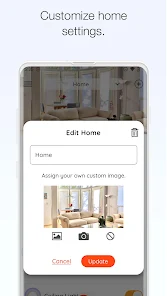
Use the Hubspace app to set up your Hubspace smart products and begin managing your connected home in just minutes.
Organize your products by room and property, set schedules, or change product settings as needed using app controls. Manage and monitor your products at home or remotely.
DEVICE SETTINGS
Questions abou...
Use the Hubspace app to set up your Hubspace smart products and begin managing your connected home in just minutes. Organize your products by room and property, set schedules, or change product settings as needed using app controls. Manage and monitor your products at home or remotely. DEVICE SETTINGS
Download Hubspace
Get the official app from the trusted app stores. You will be redirected to the download page.
When you purchase through links on our site, we may earn an affiliate commission. Learn more
Ratings breakdown
50,900 reviewsDeveloper contact
Name
Afero, Inc.
Address
4410 El Camino Real Ste 200 Los Altos, CA 94022 United States
Website
http://www.hubspaceconnect.comPhone
+1 650-899-0091
Support
customer_care@homedepot.com
Privacy
View policyFrequently Asked Questions
Is Hubspace free to download? high
Yes. The app metadata lists Hubspace as free.
Source: app_metadata
What do sampled users complain about in Hubspace? low
Hubspace has sampled reports about account access, login, or recovery problems. Only 1 sampled review supports this theme, so confidence is low.
Source: user_reviews
What do sampled users like about Hubspace? low
Hubspace is praised by sampled reviewers as easy, useful, or convenient. Only 1 sampled review supports this theme, so confidence is low.
Source: user_reviews
How to Use
Use the Hubspace app to set up your Hubspace smart products and begin managing your connected home in just minutes.Organize your products by room and property, set schedules, or ch (app_description)
Getting Started
Source: app_description_and_user_feedback_noted
- Install Hubspace from the appropriate app store.
- Open the app and start with the free experience.
- Review the main features described in the app listing.
- Check settings or support resources if you run into sampled issue patterns such as hubspace has sampled reports about account access, login, or recovery problems.
Key Features (from app listing)
Source: app_description
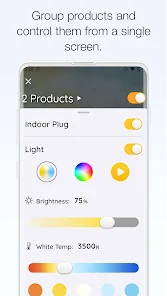
- Change light color temperature settings and colors
- Integrate with Google Assistant and Alexa
- House & Home app experience
- Free download
- From Afero
- 1,000,000+ downloads listed
Theme 'easy, useful, or convenient to use' identified in recent_reviews #3. Review #3 praises easy, useful, or convenient to use.
How this content was created
Content type: pattern_analysis_of_user_reviews_and_metadata
AI generated: Yes
- Google Play user reviews (12-20 preferred; may be smaller if source data is limited per app), March 29, 2026 to May 13, 2026
- Google Play ratings distribution
- App Store listing metadata
- Review samples are not statistically representative of all user sentiment
- High-engagement negative reviews can overrepresent complaints
- Claims labeled 'low confidence' are based on single-review observations only
- No real-world app testing was conducted
- Feature availability may vary by region, device, and app version
Pros & Cons
Based on analysis of Google Play user reviews
Pros
- On/off controls medium
Extracted from app description
- Change light color temperature settings and colors medium
Extracted from app description
- Control Fan Speed medium
Extracted from app description
- Integrate with Google Assistant and Alexa medium
Extracted from app description
- And moreQuestions about your Hubspace products? Contact The Home Depot’s Hubspace Customer Support team at 1-877-592-5233 from Monday – Friday 8AM-7PM EST and Saturday 9AM-6PM EST. For Canada: By clicking “Install”, you acknowledge having read and understood this Description and consent to the installation of The Home Depot’s Hubspace mobile application and all updates and upgrades thereto (the “App”). The App allows you to build a home network of smart products and to control them from your device. It collects, uses and discloses certain personal information for this purpose, as set out more fully in the Privacy and Security Statement at https://www. homedepot. com/privacy/Privacy_Security. You can withdraw your consent at any time, though certain withdrawals of consent may limit your ability to use the App as designed or at all. Home Depot of Canada Inc. 400-1 Concorde Gate | Toronto ON M3C 4H9 | The Home Depot Canada |privacy@homedepot. ca | Privacy Policy https://www. homedepot. com/privacy/Privacy_Security. medium
Extracted from app description
Cons
- Some users report issues: "You can tell alot of resources went into making this app marketable. All you need to do to use is buy the product, create an account, give your email," low
Identified from 3 low-rated user review(s)
Evidence (3)
“You can tell alot of resources went into making this app marketable. All you need to do to use is buy the product, create an account, give your email, location, wifi password, and then figure out how ”Rating: 2★ May 13, 2026“I was planning to buy some Commercial Electric smart switches and a remote. I figured I should try out the app first, since it will be required to configure the remote. I'm glad I did. It feels like i”Rating: 1★ May 03, 2026 2 likes“Every so often I get to come back here with ANOTHER reason for a 1-star review. This time, the most recent update just won't detect any of the devices I've been using for YEARS. It just hangs on the p”Rating: 1★ May 05, 2026 1 likes
Recent Reviews
Graham
2★You can tell alot of resources went into making this app marketable. All you need to do to use is buy the product, create an account, give your email, location, wifi password, and then figure out how to digitally turn on your plug. Oh if you have to turn off your breaker or unplug the device at any time, good luck. You'll need to manually unpair and rescan every device. The UI is non-intuituve, but THANK GOD there's a whole section (¼) for buying more product. I do like the dark mode though, +1.
Nick
1★I was planning to buy some Commercial Electric smart switches and a remote. I figured I should try out the app first, since it will be required to configure the remote. I'm glad I did. It feels like it was designed by college students 10 years ago. Very clunky and ugly. But that alone isn't a huge deal. What led me to reconsider the commercial electric switches entirely is that the app has a large, permanent ad for other HD products on the top of the screen. In this case air conditioners.
Gilbert Moreno
3★It would be incredibly useful if the app offered an option to automatically turn a ceiling fan on or off based on real-time weather conditions for a selected ZIP code. Users could set their own temperature thresholds, and the fan would adjust accordingly when the outdoor temperature rises above or falls below those settings. This type of feature is not commonly available, and implementing it would position Hubspace ahead of the curve. It would provide both convenience and potential energy saving
Lindsay W
1★Every so often I get to come back here with ANOTHER reason for a 1-star review. This time, the most recent update just won't detect any of the devices I've been using for YEARS. It just hangs on the page that says it's searching for them. It doesn't even give me an opportunity to try signing out and back in. Buying these bulbs was such a mistake. Seriously don't waste your time or money.
Scott Ferrell
1★In the app it's simple to add sensors and it shows their battery life. The issue is it doesn't have enough notification categories so it uses the same sound for all notifications including if someone disarms the alarm, sets off the alarm, and on occasion when motion is detected. Last, it provides the notification late, often not until I unlock my phone's screen. With these fixes their security system could be great. Their support service is poor about responding.