By AppHub Editorial Team · Updated August 3, 2026

PXPlay: Remote Play




Overview
Tools
Streaming Dev
Free
Jul 14, 2020
8.0.2
6.0
No
May 5, 2026
Features
Introduction
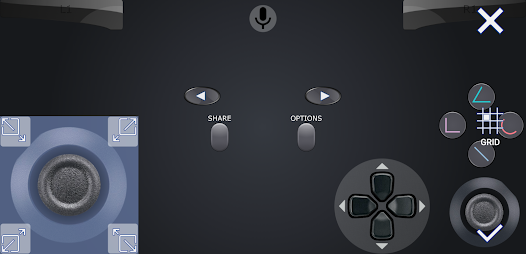
PXPlay offers you the possibility to remote control your gaming device without limitations. You can play your favorite games remotely while you are away (more information below
Key features
IntroductionPXPlay offers you the possibility to remote control your gaming device without limitations. You can play your favorite games remotely while you are away (more information below
Download PXPlay: Remote Play
Get the official app from the trusted app stores. You will be redirected to the download page.
Official Links
When you purchase through links on our site, we may earn an affiliate commission. Learn more
Ratings breakdown
22,000 reviewsDeveloper contact
Name
Florian Grill
Address
Haidenweg 14 3631 Ottenschlag Austria
Website
https://streamingdv.com/Phone
+43 681 20247196
Support
streamingdv@outlook.com
Privacy
View policyFrequently Asked Questions
Is PXPlay: Remote Play free to download? high
Yes. The app metadata lists PXPlay: Remote Play as free.
Source: app_metadata
How to Use
IntroductionPXPlay offers you the possibility to remote control your gaming device without limitations. (app_description)
Getting Started
Source: app_description_and_user_feedback_noted
- Install PXPlay: Remote Play from the appropriate app store.
- Open the app and start with the free experience.
- Review the main features described in the app listing.
- Adjust app settings based on your preferences.
Key Features (from app listing)
Source: app_description
- Enhance video quality with FSR upscaling and sharpening
- 3rd Party controller support for all Android devices
- PXPlay allows to use mobile data
- Supports Android TV devices
- Supports gamepad button mapping
- You can register multiple profiles
How this content was created
Content type: pattern_analysis_of_user_reviews_and_metadata
AI generated: Yes
- Google Play user reviews (12-20 preferred; may be smaller if source data is limited per app), January 13, 2022 to May 04, 2026
- Google Play ratings distribution
- App Store listing metadata
- Review samples are not statistically representative of all user sentiment
- High-engagement negative reviews can overrepresent complaints
- Claims labeled 'low confidence' are based on single-review observations only
- No real-world app testing was conducted
- Feature availability may vary by region, device, and app version
Pros & Cons
Based on analysis of Google Play user reviews
Pros
- Users appreciate the app: "After a few back and forths with the developer, I was finally able to sync up my PlayStation with the app. The issues wi" high
Extracted from 3 high-rated user review(s)
Evidence (3)
“After a few back and forths with the developer, I was finally able to sync up my PlayStation with the app. The issues with hooking up my PS through my PSN account, not having to go through a bunch of ”Rating: 4★ May 04, 2026“Been messing with the app for a handful of days now, and I can't even begin to say enough good things about it. I still haven't figured out how to get the Internet play part figured out since some of ”Rating: 5★ January 19, 2026 11 likes“Everything works very well. You will have to tinker with the settings to find that sweet spot for less/no frame-rate drop... 1 major thing I'm still figuring out: I couldn't play with friends. I have ”Rating: 4★ March 22, 2022 34 likes - IntroductionPXPlay offers you the possibility to remote control your gaming device without limitations. You can play your favorite games remotely while you are away (more information below medium
Extracted from app description
- ). PXPlay has been optimized to provide streaming experiences with the lowest possible latency. Third-Party controllers and mobile data connections are supported. Key features medium
Extracted from app description
- Enhance video quality with FSR upscaling and sharpening medium
Extracted from app description
- 3rd Party controller support for all Android devices medium
Extracted from app description
Cons
- No significant user complaints identified from sampled reviews low
No negative review patterns detected in recent reviews
Recent Reviews
Mike Keiper
4★After a few back and forths with the developer, I was finally able to sync up my PlayStation with the app. The issues with hooking up my PS through my PSN account, not having to go through a bunch of extra steps including having to put my IP address in, I can't give it a 5, but I can give it a strong 4. I thought the connection was pretty stable, only cutting at odd times, probably not fault or the app. There's a good amount of settings, which is nice. I definitely recommend this app
CJ Rainyday
5★Been messing with the app for a handful of days now, and I can't even begin to say enough good things about it. I still haven't figured out how to get the Internet play part figured out since some of the errors can be a bit technical with how your router is setup, but that's in no way the app creator's fault. If anything I applaud how detailed & helpful the troubleshooting pages are setup to be. The only star I'll take away is from myself for not having tried this much sooner.
One & Only
4★Everything works very well. You will have to tinker with the settings to find that sweet spot for less/no frame-rate drop... 1 major thing I'm still figuring out: I couldn't play with friends. I have access to online, yes. But when it comes to actually inviting someone to join, they couldn't join. This is currently only on "Elden Ring", so I'll test out other games. 👍🏾
Stephen Mercado
5★This app is a dream come true. It lets me connect my Razer Kishi to play my ps5 from anywhere like it's a Nintendo switch. Even better, it can use data, or wifi. There is some technical things you have to do to set up and get it working. However there is a guide for it. I'm not the most computer savvy and I was able to figure it out. This thing is awesome. Would rate is 6 stars if I could.
Miguel Quiroz
5★Edit: This was originally a 1 star review. Shortly after this I emailed the developer & they were so helpful. I slept a little late because they stayed up helping me out. We were able to find a solution. They also respond quickly. This is the best costumer service I've had. For those who have the same S21 issue, make sure that you disable game Booster plus & priority mode if you have that enabled. Maybe just disable the game plugins entirely. I hope this helps.