By AppHub Editorial Team · Updated August 3, 2026

Clime: NOAA Weather Radar Live




Overview
Weather
Mosaic Srl
Free
May 4, 2016
1.72.7
8.0
$0.99 - $81.99 per item
No
Oct 24, 2025
Features
Clime: NOAA Weather Radar Live is an all-in-one weather tracker right on your device.
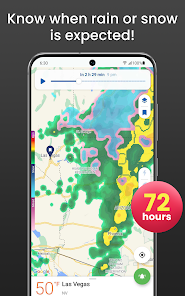
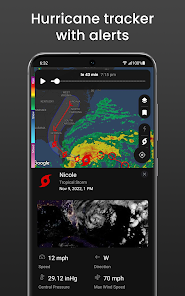
Consider Clime your one-stop weather radar app. Keep current with important weather changes using real-time radar images, precipitation and temperature forecasts, customizable weather alerts, accurate weather maps, and more. Concerned about Hurricane Season? Stay ahead of it with the Hurricane Tracker.
Take advantage of having accurate US radar data, like detected areas of rain, snow, and mixed precipitation...
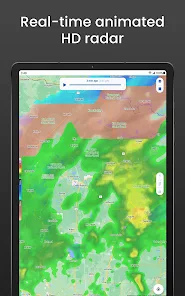
Clime: NOAA Weather Radar Live is an all-in-one weather tracker right on your device. Consider Clime your one-stop weather radar app. Keep current with important weather changes using real-time radar images, precipitation and temperature forecasts, customizable weather alerts, accurate weather maps, and more. Concerned about Hurricane Season? Stay ahead of it with the Hurricane Tracker. Take advantage of having accurate US radar data, like detected areas of rain, snow, and mixed precipitation, right on your phone. Use the radar map to check precipitation’s movement, and make your own predictions based on animated radar images for the last 40 minutes, up to the current time. Switch between the rain radar and other overlays in app settings, or customize the radar map by tweaking opacity of radar images and choosing the most convenient loop speed and background map for your radar. STAY INFORMED
Download Clime: NOAA Weather Radar Live
Get the official app from the trusted app stores. You will be redirected to the download page.
Official Links
When you purchase through links on our site, we may earn an affiliate commission. Learn more
Ratings breakdown
423,000 reviewsDeveloper contact
Name
MOSAIC SRL
Address
VIA NINO BONNET 10 20154 MILANO Italy
Website
https://support.climeradar.com/Phone
+1 650-379-0922
Support
support@climeradar.com
Privacy
View policyFrequently Asked Questions
Is Clime: NOAA Weather Radar Live free to use? high
Yes, the app is free to download and use. However, it contains ads and offers optional in-app purchases and subscriptions (priced $0.99 - $81.99 per item) to remove ads and unlock premium features like a hurricane tracker, lightning tracker, 72-hour precipitation forecast, and more.
Source: app_metadata
Does Clime still provide accurate weather radar data? low
Recent user reviews indicate mixed opinions. While the app was historically praised for accuracy, at least one recent reviewer reports that data has become 'completely unreliable' in the last year or two. This is based on a single review, so it may not represent most users' experience.
Source: user_reviews, app_metadata
Can I remove ads in Clime? medium
Yes, ads can be removed by purchasing a premium subscription. The app description notes that the Pro version offers 'no ads' as a feature. Recent users have complained that free-version ads are intrusive and sometimes break app functionality.
Source: app_metadata, user_reviews
Is Clime available outside the United States? high
Yes, the app provides radar coverage for the US, parts of Canada, Mexico, Australia, Japan, many European countries, and others. Precipitation, temperature, and snow forecast maps are available for most of the world. NWS watches and warnings are US-only.
Source: app_metadata
Does Clime have a paid subscription that auto-renews? high
Yes, subscriptions auto-renew unless canceled at least 24 hours before the end of the current period. You can manage auto-renewal in your Google Play Account Settings.
Source: app_metadata
How to Use
Clime: NOAA Weather Radar Live provides real-time weather radar, forecasts, and customizable alerts based on NOAA data. (app_description)
Getting Started
Source: app_description_and_user_feedback_noted
- Download and open the app. Grant location permissions to see local weather automatically.
- View the radar map to see precipitation movement. Use the animation feature to see the last 40 minutes of weather patterns.
- Set up bookmarked locations for quick access to weather for multiple areas (e.g., home, work, travel destinations). Note: some users find managing many saved locations difficult due to the map-based deletion interface.
- Configure notification settings to receive severe weather alerts (tornado, hurricane, freeze warnings) for your bookmarked locations.
Key Features (from app listing)
Source: app_description
- Real-time weather radar with animated precipitation images
- 24-hour precipitation and 7-day local weather forecasts
- Detailed weather metrics: temperature, humidity, wind, pressure, dew point, visibility
- Interactive NWS watches, warnings, and alerts shown as polygons on the map
- Hurricane tracker and lightning tracker (premium features)
- Customizable radar overlays: choose loop speed, opacity, and background map
- Bookmark multiple locations for easy navigation
- Sunrise/sunset times and 'Feels Like' temperature
This tip is derived from recent user feedback about ad frustration (Reviews #4 and #5) and the app metadata listing 'no ads' and premium features as part of the Pro subscription.
How this content was created
Content type: pattern_analysis_of_user_reviews_and_metadata
AI generated: Yes
- Google Play user reviews (5 (only recent_reviews bucket was available) per app), May 2024 to January 2026 based on available review dates
- Google Play ratings distribution
- App Store listing metadata
- Review samples are not statistically representative of all user sentiment
- Only 5 recent reviews were available; liked_negative, liked_positive, and mixed buckets were missing
- Claims labeled 'low confidence' are based on single-review observations only; claims labeled 'medium' rely on 2-4 reviews from one bucket
- No real-world app testing was conducted
- Feature availability may vary by region, device, and app version
- The sample period spans May 2024 to January 2026, which may not reflect the current app version (1.72.7)
- Ratings distribution data was not available to contextualize the sample
Pros & Cons
Based on analysis of Google Play user reviews
Pros
- Generally good app with useful features like lightning tracker and real-time radar.
Theme 'Overall quality' identified in recent_review #3 and #4
- Provides weather alerts and notifications for bookmarked locations.
Theme 'Alerts' identified in recent_review #1
- Allows users to report local weather conditions (rainy or sunny).
Theme 'User reporting' identified in recent_review #1
Cons
- Intrusive ads that can block critical weather alerts, including tornado warnings.
Theme 'Dangerous ads' identified in recent_review #4 and #5
- Key features like future radar and lightning tracker require a paid subscription.
Theme 'Paywalled features' identified in recent_review #1 and #3
- Geolocation is inaccurate, often showing location 10-15 miles away from actual position.
Theme 'Inaccurate geolocation' identified in recent_review #2
Recent Reviews
Elliot Pfeiffer
3★This used to be my go-to app for weather, real-time radar, and alerts. I appreciate that you can report different weather outside, but there's only two really generic options: Rainy or Sunny. It also sends you notifications about the current temperature, which I also like, but if you go to a different town, it'll still give data on the town you were last in. And to do ANYTHING else, you need to have a subscription. Dude, you can't even view the future radar without it. 😑
Greg Henle
3★Managing saved locations is difficult. If you travel a lot and save travel locations for local weather, you accumulate a lot of saved places. To delete them, you then have to scroll around the map, tap the bookmark. Not a bad idea in theory but in practice, when the map auto updates and centers on your location again... Regarding geolocation. It's inaccurate. I see it initially has my location correct but then it "corrects" the location to be about 10 to 15 mi away from my current location.
Hannah Legacy
2★Kinda mad I forgot to cancel this before it renewed honestly. This was my favorite weather app for a really long time. I found it to be really accurate and my favorite part was the lightning tracker. In the last year or two the data has become completely unreliable, and the lightning feature straight up does not work. It stopped working OVER a year ago... How is this not fixed by now?? I'd understand if it was a free app, but I pay 20 bucks a year. Do yourself a favor and get WeatherBug.
Steve Hale
3★App is generally very good. The ads are somewhat annoying, but I get it -- it's a free app, they have to pay for it somehow. HOWEVER..... Lately one of the pop-up ads just goes to a completely black screen with no way to get back to the radar. Closing/reopening the app does not work, engaging/disengaging airplane mode does not work. The only way to get back to normal operation is to reboot the phone, which has me looking for a new radar app
Michael Kolodzie
2★The app was great for the weather. The advertising is terrible and relentless. The commercial times start, and then you can't delete them or stop the ad. Therefore, you can't even see the weather most of the time. The ads are really annoying, but I understand they have to pay for the app somehow. HOWEVER, one of the pop-up ads just blocked the Tornado warnings, jeopardizing our lives. We couldn't even watch the weather because the ad was more important than the weather.