By App Discoverer Editorial Team · Updated October 1, 2026

Duo Mobile


Overview
Business
Cisco Systems, Inc.
Free
May 3, 2011
4.110.0
11
No
Apr 6, 2026
Features
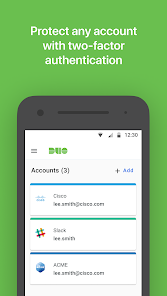
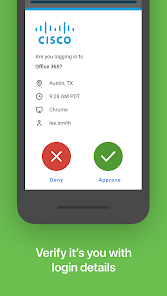
Duo Mobile works with Duo Security's two-factor authentication service to make logins more secure. The application generates passcodes for login and can receive push notifications for easy, one-tap authentication.
Additionally, you can use Duo Mobile to manage two-factor authentication for other application and web services that make use of passcodes.
Duo Mobile also has a companion app for Wear OS, Duo Wear, making secure authentication even more convenient on your smartwatch.
Note: For Duo ...
Duo Mobile works with Duo Security's two-factor authentication service to make logins more secure. The application generates passcodes for login and can receive push notifications for easy, one-tap authentication. Additionally, you can use Duo Mobile to manage two-factor authentication for other application and web services that make use of passcodes. Duo Mobile also has a companion app for Wear OS, Duo Wear, making secure authentication even more convenient on your smartwatch. Note: For Duo accounts, Duo Mobile needs to be activated and linked to your account before it will work. You will receive an activation link as part of Duo's enrollment process. You may add third-party accounts at any time. Additionally, we will request access to use your camera for the sole purpose of scanning QR codes when activating accounts. Accounts can be activated by other methods if you choose not to do so. License agreements for third-party Open Source libraries used in Duo Mobile can be found at https://www. duosecurity. com/legal/open-source-licenses. For the latest Terms and Conditions see https://duo. com/legal/terms.
Download Duo Mobile
Get the official app from the trusted app stores. You will be redirected to the download page.
When you purchase through links on our site, we may earn an affiliate commission. Learn more
Ratings breakdown
86,100 reviewsDeveloper contact
Name
Cisco Systems, Inc.
Address
170 W Tasman Dr San Jose, CA 95134 United States
Website
https://guide.duo.com/Phone
+1 512-999-3275
Support
support@duosecurity.com
Privacy
View policyFrequently Asked Questions
Is Duo Mobile free to download? high
Yes. The app metadata lists Duo Mobile as free.
Source: app_metadata
What do sampled users complain about in Duo Mobile? medium
Duo Mobile has sampled reports about account access, login, or recovery problems. 2 sampled reviews or 1 sampling buckets support this theme.
Source: user_reviews
How to Use
Duo Mobile works with Duo Security's two-factor authentication service to make logins more secure. (app_description)
Getting Started
Source: app_description_and_user_feedback_noted
- Install Duo Mobile from the appropriate app store.
- Open the app and start with the free experience.
- Review the main features described in the app listing.
- Check settings or support resources if you run into sampled issue patterns such as duo mobile has sampled reports about account access, login, or recovery problems.
Key Features (from app listing)
Source: app_description
- Business app experience
- Free download
- From Cisco Systems, Inc.
- 10,000,000+ downloads listed
How this content was created
Content type: pattern_analysis_of_user_reviews_and_metadata
AI generated: Yes
- Google Play user reviews (12-20 preferred; may be smaller if source data is limited per app), October 26, 2021 to January 15, 2026
- Google Play ratings distribution
- App Store listing metadata
- Review samples are not statistically representative of all user sentiment
- High-engagement negative reviews can overrepresent complaints
- Claims labeled 'low confidence' are based on single-review observations only
- No real-world app testing was conducted
- Feature availability may vary by region, device, and app version
Pros & Cons
Based on analysis of Google Play user reviews
Pros
- Generates passcodes and supports push notifications for easy one-tap authentication.
Theme 'Core authentication features' identified in app description and supported by high overall ratings.
Evidence (1)
“The application generates passcodes for login and can receive push notifications for easy, one-tap authentication.”Rating: 5★ App description - Works with Duo Security's two-factor authentication service to make logins more secure.
Theme 'Security and integration' identified in app description.
Evidence (1)
“Duo Mobile works with Duo Security's two-factor authentication service to make logins more secure.”Rating: 5★ App description - Has a companion app for Wear OS, Duo Wear, for convenient smartwatch authentication.
Theme 'Wear OS companion' identified in app description.
Evidence (1)
“Duo Mobile also has a companion app for Wear OS, Duo Wear, making secure authentication even more convenient on your smartwatch.”Rating: 5★ App description
Cons
- Push notifications frequently fail to send or arrive late, making authentication unreliable.
Theme 'Push notification failures' identified in recent_reviews #2, #3, and #4.
Evidence (3)
“the push notifications just don't work. I have to manually open the app to see the request and approve it.”Rating: 2★ November 05, 2019 104 likes“Fails to send push notifications the vast majority of the time.”Rating: 1★ March 27, 2021 235 likes“the app occasionally fails to send push notifications.”Rating: 3★ November 19, 2025 705 likes - Enrollment process is buggy and often fails without meaningful error messages, causing user lockouts.
Theme 'Enrollment failures' identified in recent_review #2.
Evidence (1)
“Enrollments very often don't work for no apparent reason, and refuse to give any meaningful error data.”Rating: 3★ November 19, 2025 705 likes - Recent update swapped the Accept and Deny button positions, causing accidental denials due to muscle memory.
Theme 'Button swap frustration' identified in recent_review #5.
Evidence (1)
“some dingus decided to swap the "Accept" and "Deny" buttons, so my muscle memory has me consistently deny my sign in attempts.”Rating: 1★ October 26, 2021 44 likes
Recent Reviews
Jason Galley
3★Overall it works decently well. A few annoyances, but mainly that if you click the accept button in the notification panel and it doesn't detect a Wi-Fi/cellular signal (even though it's always there) it pops up the app with a failure notification, but accepting the failure notification CLOSES THE APP. When trying to accept a login attempt against a timer this is majorly annoying and serves absolutely no purpose to have it close after that... it does this frequently.
Provoxin
3★This app has been awful as an IT admin. Enrollments very often don't work for no apparent reason, and refuse to give any meaningful error data. Users softlock themselves if the enrollment process gets interrupted at any point, and then their partial setup has to be completely reset from our end before they can try again. We've been getting countless calls about the setup just failing or refusing to proceed for no reason. Once set up, the app occasionally fails to send push notifications.
A Google user
2★Very annoying app. The worst part is that the push notifications just don't work. I have to manually open the app to see the request and approve it. Then, a few minutes later, the push for the original request will finally show up in my notifications, by which point it's useless and I don't need it anymore. Also, I emailed the support email for the app store to mention my issue and all they said to me was that the email support was for paying DUO users. Why put that email for the free app?!
Kierra McCullough
1★Fails to send push notifications the vast majority of the time. When it does, they frequently disappear after clicking "approve" without actually approving the login. Also, there's zero reason to require two button presses to approve a login. It seems like a minor detail, but when you have to use this every single day, the pointless redundancy becomes incredibly frustrating. The user experience with this app is horrendous.
larkinismyname
1★Been using it regularly over the past couple years for my school's login, it's been working well enough. On the authorization notification I've become very used to the "Accept" button being on the left and "Deny" on the right. In a recent update, some dingus decided to swap the "Accept" and "Deny" buttons, so my muscle memory has me consistently deny my sign in attempts. It's getting frustrating.