By AppHub Editorial Team · Updated August 3, 2026
Bank of America Mobile Banking





Overview
Finance
Bank of America
Free
No
Features
Bank conveniently and securely with the Bank of America® Mobile Banking app for U. S.-based checking, savings, credit card, loan and investment accounts.
Manage Accounts
Transfer Money and Pay Bills
Bank conveniently and securely with the Bank of America® Mobile Banking app for U. S.-based checking, savings, credit card, loan and investment accounts. Manage Accounts
Download Bank of America Mobile Banking
Get the official app from the trusted app stores. You will be redirected to the download page.
When you purchase through links on our site, we may earn an affiliate commission. Learn more
Ratings breakdown
1,180,000 reviewsDeveloper contact
Name
Bank Of America, National Association
Address
17100 NW 59th Ave Hialeah, FL 33015 United States
Phone
+1 980-683-5288
Support
mobileappstore@bofa.com
Privacy
View policyFrequently Asked Questions
Is the Bank of America Mobile Banking app free? high
Yes, the app is free to download and use. However, standard mobile carrier message and data rates may apply when using features.
Source: app_metadata, app_description
Can I deposit checks with the Bank of America app? high
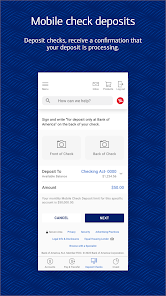
Yes, you can deposit checks by taking photos of them through the app. The app provides immediate confirmation that your check is processing.
Source: app_description, user_reviews
Does the Bank of America app support Zelle? high
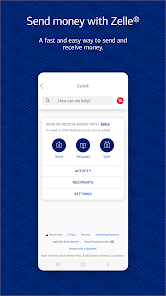
Yes, the app supports sending and receiving money with Zelle using a U.S. mobile number or email address.
Source: app_description
Is the app secure? high
The app includes security features like Touch ID / Face ID, fraud alerts, and a Mobile Banking Security Guarantee that states you are not liable for fraudulent transactions when reported promptly within 60 days.
Source: app_description
How to Use
The Bank of America Mobile Banking app allows you to manage your accounts, deposit checks, transfer money, and pay bills from your mobile device. (app_description)
Getting Started
Source: app_description_and_user_feedback_noted
- Download the app from the Google Play Store and install it on your Android device.
- Log in using your Bank of America Online Banking username and password. If you have biometric security enabled, you can set up Touch ID or Face ID for faster access.
- After logging in, navigate the main screen to view account balances and recent activity for your linked checking, savings, credit card, loan, and investment accounts.
- To deposit a check, select the 'Deposit Checks' option and follow the prompts to take photos of the front and back of your endorsed check.
Key Features (from app listing)
Source: app_description
- Manage Accounts: View balances, review activity, and activate or replace debit and credit cards.
- Transfer Money & Pay Bills: Use Zelle to send/receive money with a US mobile number or email address, and pay bills directly from the app.
- Check Deposit: Deposit checks by taking photos with your device's camera.
- Erica Virtual Assistant: Ask Erica to find transactions, pay bills, and get helpful alerts and insights.
- FICO Credit Score Check: View your FICO credit score and understand factors affecting it.
- Investment Management: Trade stocks and ETFs, view market data, and send messages to your Merrill advisor.
Tip derived from recent user reviews. Review #3 (February 24, 2026) mentions that after reinstalling the app, it worked better, though bill pay limitations remained. Review #5 (February 11, 2026) mentions a change to the bill pay system that is less intuitive.
How this content was created
Content type: pattern_analysis_of_user_reviews_and_metadata
AI generated: Yes
- Google Play user reviews (5 per app), January 11, 2025 to February 24, 2026
- Google Play ratings distribution
- App Store listing metadata
- Review samples are not statistically representative of all user sentiment. The sample of 5 reviews is very small.
- No high-engagement negative reviews, high-engagement positive reviews, or mixed reviews were available, limiting the ability to detect broader patterns.
- Claims labeled 'low confidence' are based on single-review observations only.
- Claims labeled 'medium confidence' are based on two reviews from the same bucket, providing limited cross-validation.
- No real-world app testing was conducted.
- Feature availability may vary by region, device, and app version.
Pros & Cons
Based on analysis of Google Play user reviews
Pros
- Easy navigation and allows most banking tasks like check deposits without disruption.
Theme 'Easy navigation and check deposits' identified in recent_review #4.
Evidence (1)
“I have been using the app for quite some time. It is easy to navigate and allows you to do most of the things without disruption including check deposits etc.”Rating: 5★ December 28, 2025 866 likes - Erica virtual assistant helps find transactions and pay bills.
Theme 'Erica virtual assistant' identified in app description.
Evidence (1)
“Ask Erica to find transactions, pay bills and more. Get valuable alerts, and helpful insights”Rating: 5★ N/A - Secure with Touch ID/Face ID and fraud alerts.
Theme 'Security features' identified in app description.
Evidence (1)
“Set up Touch ID® / Face ID®. If fraudulent activity is suspected on your card, we’ll notify you”Rating: 5★ N/A
Cons
- Cannot set up notifications for debit card transactions under $50.
Theme 'No low-value transaction alerts' identified in recent_review #1.
Evidence (1)
“I find it ridiculous how you still can't set up notifications for ANY debit card transaction. It has to be a minimum of $50 or $100.”Rating: 2★ January 11, 2025 97 likes - Bug prevents receiving text code for login; must use less secure email.
Theme 'Text code login bug' identified in recent_review #2.
Evidence (1)
“I am unable to get a text code to open the app into my account. I can only use an email address to receive my code (which is less secure). So, I have to uninstall then reinstall the app to get it to work.”Rating: 3★ February 22, 2026 17 likes - Bill pay system changed to be less intuitive and limits payment amounts.
Theme 'Bill pay issues' identified in recent_review #3.
Evidence (2)
“not able to pay bill and setup auto pay, app just goes in circles... still not able to set up auto pay for set amount, can only do minimum payment.”Rating: 3★ February 24, 2026 6 likes“It doesn't provide the ability to make a payment above the minimum amount on some bills. It was a snap paying bills before this change.”Rating: 2★ February 11, 2026 49 likes
Recent Reviews
Loyalty
2★I find it ridiculous how you still can't set up notifications for ANY debit card transaction. It has to be a minimum of $50 or $100. An institution this big and the fees they charge should at least have an option that's so simple, but very useful. It's been over decade and the features of this app are virtually the same, yet it gets even harder to access your account over the phone. Ridiculous
Karen M
3★This app has recently had a bug that's very annoying. I am unable to get a text code to open the app into my account. I can only use an email address to receive my code (which is less secure). So, I have to uninstall then reinstall the app to get it to work. The bank rep I called for assistance told me to check my text spam folder. Huh?? No such thing! Not sure I'll still keep using the app.
Susan Keeney
3★I can log in, but not able to pay bill and setup auto pay, app just goes in circles. I'll try again, 4th time... edit, tried again, works better, but still not able to set up auto pay for set amount, can only do minimum payment. I think the app is begin n by updated, it works a little better for sure, changing rating to 3, will update higher if autopay works for determined amount, not just minimum.
Satish Kalra
5★I have been using the app for quite some time. It is easy to navigate and allows you to do most of the things without disruption including check deposits etc. Keep up the good work. The recent changes (Jan 24) in the App have improved the interaction with individual accounts. However the recipient search in Zelle is quite slow and needs improvement. Bank app does not allow a customer to initiate any message back to the bank. Overall it is a friendly and useful app.
Ian
2★feb 13 a few months ago they changed how to pay bills in online banking and after learning and using this new system to pay bills it's not as easy and straight forward as its predecessor to use and takes longer. It doesn't provide the ability to make a payment above the minimum amount on some bills. It was a snap paying bills before this change.