By AppHub Editorial Team · Updated August 3, 2026
The Roku App (Official)




Overview
Entertainment
Roku, Inc. & its affiliates
Free
Mar 2, 2012
13.5.0.7722687
9
No
Feb 17, 2026
Features
Get to know the must-have streaming sidekick!
Use the free Roku® mobile app to:
Get to know the must-have streaming sidekick! Use the free Roku® mobile app to:
Download The Roku App (Official)
Get the official app from the trusted app stores. You will be redirected to the download page.
When you purchase through links on our site, we may earn an affiliate commission. Learn more
Ratings breakdown
4,210,000 reviewsDeveloper contact
Name
Roku, Inc.
Address
1173 Coleman Ave San Jose, CA 95110-1104 United States
Website
http://www.roku.comPhone
+1 408-556-9040
Support
feedback@roku.com
Privacy
View policyFrequently Asked Questions
Does the Roku app work as a remote control? high
Yes, the official Roku app is primarily designed to be a remote control for your Roku devices. It must be connected to the same Wi-Fi network as your Roku device to function. Reviews confirm it works well, though some users have reported connectivity issues and dislike for a new UI layout for the directional pad.
Source: app_description, user_reviews
Is the Roku app free? high
Yes, the Roku app is completely free to download and use. It does not contain ads and has no in-app purchases listed.
Source: app_metadata
Can I watch The Roku Channel on the mobile app? high
Yes, the app description states you can 'stream free movies, live TV, and more on the go with The Roku Channel.' This feature is available in the US only.
Source: app_description
Why can't my Roku app find my TV? medium
The app requires your phone and Roku device to be on the same Wi-Fi network. Some users have reported difficulties with device detection, requiring steps like restarting the phone, TV, and router to resolve. If the app fails to find it automatically, try adding it manually by its IP address from the TV's network settings.
Source: app_description, user_reviews
How to Use
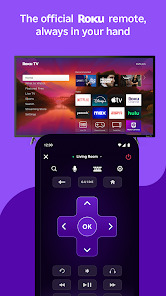
The Roku app turns your phone into a streaming sidekick for controlling Roku devices, searching for content, and accessing The Roku Channel. (app_description)
Getting Started
Source: app_description_and_user_feedback_noted
- Download and install the app from the Google Play Store.
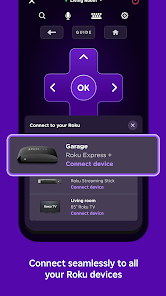
- Ensure your Android phone and Roku device are connected to the same Wi-Fi network.
- Open the app; it should automatically discover your Roku device. If not, use the 'Add Device Manually' option with your TV's IP address.
- You can now use the on-screen remote, voice search, or keyboard to control your Roku device.
Key Features (from app listing)
Source: app_description
- Full-featured remote control for Roku devices.
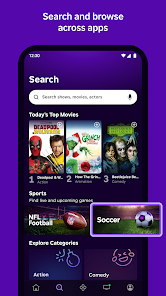
- Voice and keyboard search for content.
- Private listening via headphones connected to your phone.
- Streaming of The Roku Channel (US only).
- Cast media files (photos, videos) from your phone to the TV.
- Add and launch channels on Roku devices.
This tip is responsive to the connectivity issues reported by user 'recent_reviews #3', and suggests a practical solution mentioned in their troubleshooting steps.
How this content was created
Content type: pattern_analysis_of_user_reviews_and_metadata
AI generated: Yes
- Google Play user reviews (5 per app), August 31, 2024 to February 24, 2026
- Google Play ratings distribution
- App Store listing metadata
- Review samples are not statistically representative of all user sentiment.
- High-engagement negative reviews can overrepresent complaints.
- Claims labeled 'low confidence' are based on single-review observations only.
- No real-world app testing was conducted.
- Feature availability may vary by region, device, and app version.
- The analysis is based on a small sample of 5 recent reviews, which may not reflect the entire user base.
Pros & Cons
Based on analysis of Google Play user reviews
Pros
- The app's remote control and cross-device synchronization features are praised by recent reviewers. high
Theme 'useful functionality' identified in recent_reviews #2 and #5. Review #2 (recent_reviews) praises the consistent functionality of the remote, calling it a 'must-have'. Review #5 (recent_reviews) highlights the convenience of cross-device syncing for continued viewing. This is a recent pattern.
Evidence (2)
“Im very thankful for it (when it's working properly) because evidently my household can keep track of a single remote. I can't even find the remote I just b”Rating: 5★ June 27, 2025 1,293 likes“I love the concept that our home TVs can sync to each other and to our devices. I love that I can continue my movie from the house, into the car on a road trip. It's extremely versatile and I enjoy using it.”Rating: 4★ February 08, 2026 8 likes - App performance is reported to have improved after a period of being non-functional. medium
Theme 'improvement' identified in recent_review #2. The reviewer explicitly states they changed their review from negative to positive because the app now works consistently, after a long period of not working. This is a recent pattern noted by one user.
Evidence (1)
“Changing my review to say the app works much better now. Went from not working at all to working consistently. only took them a long while lol.”Rating: 5★ June 27, 2025 1,293 likes
Cons
- The app suffers from connectivity and device detection issues, which can be time-consuming to resolve. medium
Theme 'connectivity problems' identified in recent_review #3. The reviewer describes a 20-30 minute process of restarting devices to get the app to connect and detect the TV. This is a recent pattern reported as a significant frustration.
Evidence (1)
“I tried connecting to my TV and it didn't show up. Then Itried to do it manually by IP address—nothing. It took 20-30 minutes of restarting my phone and my TV, unpliggimg my router, reconnecting everything, then searching for devices again. eventually it worked f”Rating: 1★ August 31, 2024 345 likes - A recent UI update has been poorly received by some users, specifically concerning the remote control layout. low
Theme 'UI change' identified in recent_review #1. The reviewer explicitly dislikes the new 'big purple block' replacing the directional arrows on the remote, calling it a point of dissatisfaction. This is a recent pattern from a single review.
Evidence (1)
“What I don't like is the new center area where the arrows that make the cursor move up and down and left and right are gone and now there is a big purple block that I have t”Rating: 4★ February 20, 2026 5 likes - The app has a history of being unreliable, with reports of crashing and non-functionality. medium
Theme 'unreliability' identified in recent_reviews #2 and #4. Review #2 (recent_reviews) mentions the app 'went from not working at all to working consistently' after a long time. Review #4 (recent_reviews) states 'Loading the homepage will crash the app' and 'it is hit or miss' after a major update. This is a cross-reviewer pattern in recent reviews.
Evidence (2)
“Changing my review to say the app works much better now. Went from not working at all to working consistently. only took them a long while lol.”Rating: 5★ June 27, 2025 1,293 likes“Used to be a great app ever since the major android update it is hit or miss. Loading the homepage will crash the app... Update February 24th 2026. Working flawlessly again.”Rating: 4★ February 24, 2026
Recent Reviews
Amy Smith
4★I love the fact that I can use the Roku remote app on my phone to control all of my Roku TVs. It works well for the most part. What I don't like is the new center area where the arrows that make the cursor move up and down and left and right are gone and now there is a big purple block that I have to tap at the top, bottom, on the left side or the right side of it to move the cursor. It's not as easy to hit the correct area as it was when there was an actual arrow that showed where to tap.
Manda B
5★Changing my review to say the app works much better now. Went from not working at all to working consistently. only took them a long while lol. Im very thankful for it (when it's working properly) because evidently my household can keep track of a single remote. I can't even find the remote I just bought. It's still in the box🤦♀️🤷♀️. So I, and other family members can use the app as a remote when needed! Thank you roku😘
Justyn Tru
1★useless at worst, unoptimal at best. I tried connecting to my TV and it didn't show up. Then Itried to do it manually by IP address—nothing. It took 20-30 minutes of restarting my phone and my TV, unpliggimg my router, reconnecting everything, then searching for devices again. eventually it worked for a while, but had a couple seconds of latency for every input. then it disconnected and I couldn't find my device again. I spent more time trying to use the app than actually using it.
A1A Express Auto Shipping
4★Used to be a great app ever since the major android update it is hit or miss. Loading the homepage will crash the app... Update February 24th 2026. Working flawlessly again. Although still has that annoying issue whenever an alert comes in to your phone of any kind it will select ok on any option you might be on. If the movie you are watching is paused any alert will unpause it. Very annoying if you want to pause a movie and send a few texts!! If you guys fix this it's 5 stars all around.
Amy Adrion
4★I love the concept that our home TVs can sync to each other and to our devices. I love that I can continue my movie from the house, into the car on a road trip. It's extremely versatile and I enjoy using it. That being said; there's intermittent lagging and interruptions between the router and the TVs, and also intermittent buffering on the phones and tablets. So, it's not a perfect system. But it's still a Really cool setup.