By App Discoverer Editorial Team · Updated October 1, 2026

Samsung Smart Switch Mobile





Overview
Tools
Samsung Electronics Co., Ltd.
Free
Apr 17, 2013
3.7.69.15
5.0
No
Feb 12, 2026
Features
▣ Smart Switch gives you the freedom to move your contacts, music, photos, calendar, text messages, device settings and more to your new Galaxy device. Plus, Smart Switch™ helps you find your favorite apps or suggest similar ones on Google Play™.
▣ Who can transfer?
...
▣ Smart Switch gives you the freedom to move your contacts, music, photos, calendar, text messages, device settings and more to your new Galaxy device. Plus, Smart Switch™ helps you find your favorite apps or suggest similar ones on Google Play™. ▣ Who can transfer?
Download Samsung Smart Switch Mobile
Get the official app from the trusted app stores. You will be redirected to the download page.
Official Links
When you purchase through links on our site, we may earn an affiliate commission. Learn more
Ratings breakdown
498,000 reviewsData Safety
- No data shared with third parties Learn more about how developers declare sharing
- This app may collect these data types App activity, App info and performance, and Device or other IDs
- Data isn’t encrypted
- Data can’t be deleted
Permissions
- retrieve running apps
- read sensitive log data
- read your Web bookmarks and history
- find accounts on the device
- read your own contact card
- modify your own contact card
- read calendar events plus confidential information
- add or modify calendar events and send email to guests without owners' knowledge
- find accounts on the device
- read your contacts
- modify your contacts
- precise location (GPS and network-based)
- read your text messages (SMS or MMS)
- edit your text messages (SMS or MMS)
- read call log
- read phone status and identity
- write call log
- read the contents of your USB storage
- modify or delete the contents of your USB storage
- read the contents of your USB storage
- modify or delete the contents of your USB storage
- take pictures and videos
- record audio
- view Wi-Fi connections
- read phone status and identity
- view network connections
- pair with Bluetooth devices
- access Bluetooth settings
- change network connectivity
Developer contact
Name
삼성전자(주)
Address
대한민국 16677 경기도 수원시 영통구 삼성로 129 (매탄동)
Phone
+82 1588-3366
Support
sswitch.cs@samsung.com
Privacy
View policyFrequently Asked Questions
Can I transfer data from my old iPhone to a new Samsung Galaxy with this app? high
Yes, the app supports data transfer from iOS devices using a wired connection, iCloud import, or iTunes via a PC/Mac. You need iOS 5.0 or higher for wired transfer, and iOS 4.2.1 or higher for iCloud.
Source: app_metadata
Does Samsung Smart Switch support transferring WhatsApp data? high
No. The app description does not list WhatsApp or other third-party app specific data as transferable. It transfers contacts, messages, photos, videos, calendar, call logs, and some device settings. For WhatsApp, you would need a separate backup method.
Source: app_metadata
What are the most common problems users report with Smart Switch? medium
Based on recent user reviews, common problems include connection failures during USB-C transfers (even when physically connected), the app getting stuck on a QR code scanning step, and the lack of a pause/resume feature which can cause data loss if a phone battery dies mid-transfer.
Source: user_reviews
Is the Samsung Smart Switch app free? high
Yes, the app is free to download and use. It contains no ads.
Source: app_metadata
How to Use
Smart Switch is a free tool from Samsung that lets you move contacts, photos, messages, and other data from your old Android or iOS device to a new Galaxy device. (app_description)
Getting Started
Source: app_description_and_user_feedback_noted
- Install Smart Switch on both your old and new Samsung Galaxy devices.
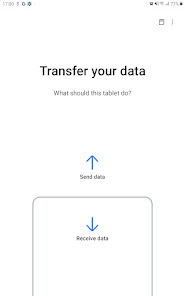
- On the new Galaxy, open Smart Switch and choose 'Receive data'.
- Allow the required permissions (Contacts, Storage/Photos, SMS, etc.) on the new device.
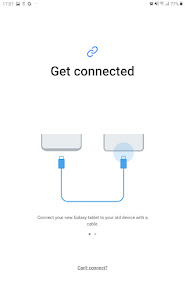
- Select the connection method: USB cable (recommended for speed) or wireless.
- If using a USB cable, connect the two phones. On the old phone, open Smart Switch and choose 'Send data'. Wait for the transfer to complete and do not disconnect until the old phone gives you a 'disconnect' notification.
- On the new Galaxy, follow on-screen prompts to finish device setup after the transfer.
Key Features (from app listing)
Source: app_description
- Transfer contacts, photos, videos, music, messages, call logs, calendar data, and device settings to a new Galaxy.
- Support for wired transfer from iOS, iCloud import, and PC/Mac iTunes transfer.
- Compatible with a wide range of Android devices (HTC, LG, Sony, Xiaomi, etc.) and recent Galaxy devices.
- Suggests similar apps from Google Play if your favorite apps are not found.
Derived from recent user review #1 (4-star) describing a transfer failing because a phone's battery ran out, and the app lacks a pause/resume function. The tip helps mitigate this verified risk.
How this content was created
Content type: pattern_analysis_of_user_reviews_and_metadata
AI generated: Yes
- Google Play user reviews (12-20 preferred; may be smaller if source data is limited per app), August 2024 to February 2026
- Google Play ratings distribution
- App Store listing metadata
- Review samples are not statistically representative of all user sentiment
- High-engagement negative reviews can overrepresent complaints
- Claims labeled 'low confidence' are based on single-review observations only
- No real-world app testing was conducted
- Feature availability may vary by region, device, and app version
- Only recent_reviews (5 of 498k total) were available; results may not represent overall sentiment
- Ratings distribution was null, limiting contextual analysis
Pros & Cons
Based on analysis of Google Play user reviews
Pros
- USB cable transfer works reliably when following on-screen prompts to wait for completion confirmation.
Theme 'Successful wired transfers' identified in recent_review #4
Evidence (1)
“It worked quite well for me using the USB cable option. Be sure to wait until your OLD phone notifies you that it's OK to disconnect the cable.”Rating: 5★ November 25, 2025 625 likes - App can transfer a wide variety of data including contacts, photos, music, and device settings.
Theme 'Comprehensive data transfer' identified in app description and recent_review #4
Evidence (1)
“Smart Switch gives you the freedom to move your contacts, music, photos, calendar, text messages, device settings and more to your new Galaxy device.”Rating: 5★ N/A - Free to use and pre-installed on Samsung devices, making initial setup convenient.
Theme 'Free and integrated' identified in app description
Evidence (1)
“Smart Switch gives you the freedom to move your contacts, music, photos, calendar, text messages, device settings and more to your new Galaxy device.”Rating: 5★ N/A
Cons
- Transfers frequently fail or disconnect mid-process, forcing restarts from the beginning.
Theme 'Transfer failures and disconnections' identified in recent_review #3
Evidence (2)
“It would get partway through, then display an error message saying the connection had been lost. They were connected by a USB-C cable!”Rating: 1★ February 03, 2026 64 likes“I kept getting a message to open the app on the other phone and scan the QR code. The only problem, their is no way to leave the app open and scan the code.”Rating: 1★ February 17, 2026 13 likes - No pause or resume function; interrupted transfers lose all progress and must restart.
Theme 'No pause/resume' identified in recent_review #1
Evidence (2)
“I really wish there was a pause function. I spent my morning trying to do a corded transfer and it was in the last few minutes when the battery in one phone ran out.”Rating: 4★ August 23, 2024 937 likes“Each time I restarted, it asked if I wanted to continue the transfer that had been interrupted. I clicked yes. It restarted the transfer from the beginning anyway.”Rating: 1★ February 03, 2026 64 likes - App data and settings often don't transfer completely, requiring manual re-login and reconfiguration.
Theme 'Incomplete data transfer' identified in recent_review #5
Evidence (1)
“Smart Switch transferred some things, but settings do not match, nearly everything wants me to sign back in, agree to their policies again, etc. and it's taking forever.”Rating: 1★ January 24, 2026 27 likes
Recent Reviews
Fae Donegan
4★I really wish there was a pause function. I spent my morning trying to do a corded transfer and it was in the last few minutes when the battery in one phone ran out. (I don't have a cordless charger.) I wish it just saved as it went, and then since you don't transfer duplicates, if someone has to stop for any reason, they can just end it, retaining what's been transferred so far, and start a new sync to transfer any remaining stuff they couldn't before.
A Google user
1★Worst thing ever!!!! I tried to connect with a cable between two Samsung phones. I kept getting a message to open the app on the other phone and scan the QR code. The only problem, their is no way to leave the app open and scan the code. The other message was to update the app but Google play is so stupid it only allowed me to download the app on a different device. Spent over an hour and nothing was ever transferred or even started.
VaneWimsey
1★The most frustrating piece of garbage ever. It would get partway through, then display an error message saying the connection had been lost. They were connected by a USB-C cable! How could they lose the connection? I must have tried 15 or 16 times, no luck. The highest I got was about 35% transferred. Each time I restarted, it asked if I wanted to continue the transfer that had been interrupted. I clicked yes. It restarted the transfer from the beginning anyway.
Chris Downs
5★It worked quite well for me using the USB cable option. Be sure to wait until your OLD phone notifies you that it's OK to disconnect the cable. Your new phone may start prompting you to do more setup, but it's probably best to hold off until you get that OK from the old one. Be prepared to spend at least a few hours getting your apps signed back in, data transferred, etc. Each app is different. Good idea to keep your old phone around & connected to Wi-Fi for a while.
No Easy Way Out
1★Pales in comparison to Apple where I could switch someone else's phone and EVERYTHING transferred. They didn't need to sign back in, agree again to privacy policies, etc. It was as easy as it should be bc the physical device changed but no settings, software, agreements, or anything else did. It was also very fast. Smart switch transferred some things, but settings do not match, nearly everything wants me to sign back in, agree to their policies again, etc. and it's taking forever. This is trash