By App Discoverer Editorial Team · Updated October 1, 2026

TikTok Studio



Overview
Video Players & Editors
TikTok Pte. Ltd.
Free
May 28, 2024
41.9.3
6.0
No
Jan 16, 2026
Features
Welcome to TikTok Studio
Unleash your creativity with our advanced tools and intuitive capabilities designed to help you and your content stand out. From identifying new opportunities to predictive analytics, TikTok Studio empowers you to take an informed and strategic approach to content creation so you can expand your reach and reach your full potential.
Welcome to TikTok Studio
Download TikTok Studio
Get the official app from the trusted app stores. You will be redirected to the download page.
When you purchase through links on our site, we may earn an affiliate commission. Learn more
Ratings breakdown
422,000 reviewsDeveloper contact
Name
TIKTOK PTE. LTD.
Address
1 Raffles Quay #26-10 Singapore 048583
Website
https://www.tiktok.com/Phone
+44 20 8092 5588
Support
feedback@tiktok.com
Privacy
View policyFrequently Asked Questions
Is TikTok Studio free to use? high
Yes, TikTok Studio is a free app developed by TikTok Pte. Ltd. and listed as free on Google Play. It does not contain ads.
Source: app_metadata
Does TikTok Studio allow scheduling posts? medium
Yes, according to user reviews, TikTok Studio allows you to schedule posts. However, users have reported that scheduled posts cannot be edited or deleted after scheduling, so you must get it right the first time.
Source: user_reviews, app_metadata
Can I edit videos with TikTok Studio? low
Yes, TikTok Studio provides editing tools. However, one user reports that the 'sound sync' feature can automatically turn on and disrupt your editing by readjusting clip lengths, potentially causing hours of work loss.
Source: user_reviews, app_metadata
Is TikTok Studio suitable for managing live streams on mobile? low
According to user feedback, the mobile version of TikTok Studio lacks live streaming preparation features such as adding video sources, images, banners, and wishlists, which are available on the desktop version.
Source: user_reviews
What is the age rating for TikTok Studio? high
TikTok Studio is rated 'Teen' on Google Play.
Source: app_metadata
How to Use
TikTok Studio is a free content creation and management app from TikTok that provides tools for editing, scheduling, analytics, monetization, and community management to help creators grow their presence. (app_description)
Getting Started
Source: app_description_and_user_feedback_noted
- Download TikTok Studio from Google Play and install it on your Android device (requires Android 6.0 or higher).
- Log in with your existing TikTok account credentials. If you encounter login issues, ensure your internet connection is stable and try restarting the app.
- Familiarize yourself with the dashboard: explore features like content creation tools, analytics, monetization recommendations, and community management.
- If you intend to schedule posts, be aware that user reviews indicate scheduled posts cannot be edited or deleted after scheduling, so double-check your content before finalizing.
- For live streaming preparation, note that full live settings may only be available on the desktop version; use the mobile app for post-scheduling and basic management.
Key Features (from app listing)
Source: app_description
- Advanced content creation tools and intuitive capabilities for video editing.
- Predictive analytics to help you identify content opportunities and optimize strategy.
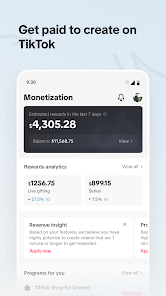
- Personalized monetization recommendations and in-depth payment analytics.
- Audience insights to understand preferences and behaviors, enabling tailored content.
- Comprehensive community management tools including post, comment, and engagement management in one place.
Derived from a user complaint in recent_reviews #1 about 'Sound Sync' automatically turning on and causing loss of editing progress.
How this content was created
Content type: pattern_analysis_of_user_reviews_and_metadata
AI generated: Yes
- Google Play user reviews (5 (limited to recent_reviews only) per app), May 25, 2025 to February 14, 2026
- Google Play ratings distribution
- App Store listing metadata
- Review samples are not statistically representative of all user sentiment.
- Only recent_reviews were available; sample size is very small (5 reviews).
- Claims labeled 'low confidence' are based on single-review observations only.
- The overall app rating (4.6 stars) is not represented in this negative-biased sample.
- No real-world app testing was conducted.
- Feature availability may vary by region, device, and app version.
Pros & Cons
Based on analysis of Google Play user reviews
Pros
- Advanced analytics and monetization recommendations help creators optimize content and earnings.
Theme 'Analytics and monetization' identified in app description
- Scheduling posts is straightforward and works as intended for planning content.
Theme 'Scheduling functionality' identified in recent_review #4
- Comprehensive privacy and community management tools give creators control over interactions.
Theme 'Safety and privacy' identified in app description
Cons
- Sound sync feature automatically adjusts clip lengths, forcing re-editing of entire videos.
Theme 'Sound sync bug' identified in recent_review #1
- App crashes and loses unsaved video files, wasting hours of work.
Theme 'Crashes and data loss' identified in recent_review #1, #3
- Scheduled posts cannot be edited or deleted, requiring perfect initial setup.
Theme 'Scheduled post limitations' identified in recent_review #4
Recent Reviews
Belle Martinez Silas
1★I will sometimes spend hours working on a video and then "sound sync" (one of the most useless features ever imo) turns itself on and if I want to switch my sound again. it readjusts the length of all my clips I just worked on. so I have REEDIT EVERY SINGLE ONE back to how it was. and if I just turn it off without changing the sound? IT STILL COMPLETELY REVERTS EVERY VIDEO BACK TO ITS ORIGINAL LENGTH. Then sometimes it will crash AND LOSE THE FILE. looking for a better app to use ASAP.
Jason Richardson
1★won't let me log in, they took down a video but when I click to find out why brings me to error page. No way to appeal. paid for promote, only got 6 more views (a fraction of the original views and the other 6 were probably from thumbnails or shares. when it says 1.2k - 4k views. Scammers! when you pay DL for services you don't receive, that is called fraud. was spending money, but ain't going to anymore!
Layne Pachico
2★What is going on with this app??? It's getting worse and worse! When I first started using it, it was good... As time has passed, its gotten more and more glitchy - to the point of losing entire videos, having to save a video multiple times to save myself from the app inevitably ruining the video, or deleting my hard work in the editing process. Seriously... it's getting bad.
Alex Littman
3★Well, if your goal is to schedule posts, it will do that. The issues are fairly numerous after that. 1) The app will not delete a post after it's scheduled. 2) Unable to edit a scheduled post in any way, shape, or form. You better get it right the first time. 3) Account check feature is only available via the main Tiktok app, why? It's in that "studio". This app is nothing to write home about.
Tiffany Dawn
2★pointless, the mobile app doesn't help at all with live settings. I would absolutely love to be able to add video sources and images for my lives in this app to have them already stacked ready to go when I get to my desktop. I would also like to be able to make my banners and wishlist on the app too so they saved for me to add quicker in the desktop when rdy. this app really is pointless on a phone since it does nothing different at all from the TikTok app