By AppHub Editorial Team · Updated August 3, 2026

TP-Link Tapo



Overview
Lifestyle
TP-LINK SYSTEMS INC.
Free
Sep 3, 2019
3.17.803
7.0
$2.49 - $199.99 per item
No
Mar 24, 2026
Features
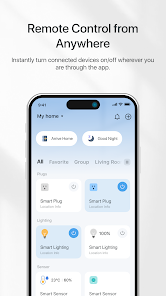
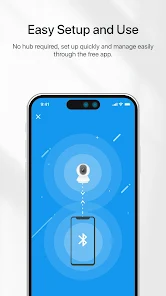
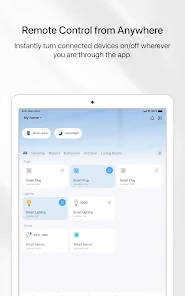
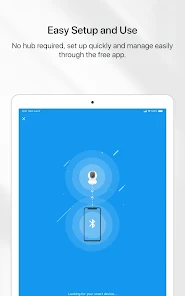
The Tapo app helps you set up the Tapo smart devices within minutes and puts everything you need at the tip of your fingers
The Tapo app helps you set up the Tapo smart devices within minutes and puts everything you need at the tip of your fingers
Download TP-Link Tapo
Get the official app from the trusted app stores. You will be redirected to the download page.
When you purchase through links on our site, we may earn an affiliate commission. Learn more
Ratings breakdown
477,000 reviewsDeveloper contact
Name
TP-Link Systems Inc.
Address
10 Mauchly Irvine, CA 92618-2306 United States
Website
https://www.tapo.comPhone
+1 866-225-8139
Support
app.support@tp-link.com
Privacy
View policyFrequently Asked Questions
Is the Tapo app free to use? high
Yes, the Tapo app is free to download and use. However, it offers in-app purchases ranging from $2.49 to $199.99 per item for additional features or services.
Source: app_metadata
Does the Tapo app work with all TP-Link cameras? medium
The app is designed for Tapo smart devices. While user feedback (from a single review) suggests compatibility with various TP-Link cameras, a different review notes that it does not recognize other brand devices. It is best to check compatibility on the device's packaging or on TP-Link's official website.
Source: user_reviews, app_description
Can I use voice control with the Tapo app? high
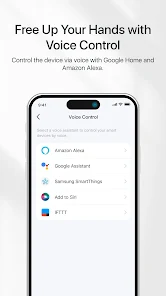
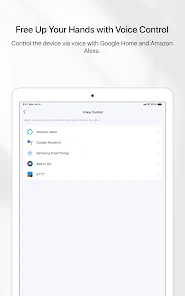
Yes, the app supports voice control via Google Home and Amazon Echo devices as stated in the app description.
Source: app_metadata
How to Use
The TP-Link Tapo app is a smart device control hub that allows you to set up and manage Tapo cameras and other smart devices remotely. (app_description)
Getting Started
Source: app_description_and_user_feedback_noted
- Download and install the Tapo app from the Google Play Store.
- Create a TP-Link account or log in with your existing account.
- Plug in your Tapo smart device (e.g., a Tapo camera) and ensure it is powered on.
- Follow the in-app instructions to pair the device by scanning the QR code on the device or following the prompts.
- Once connected, name your device and customize its settings (e.g., schedules, motion detection zones).
Key Features (from app listing)
Source: app_description
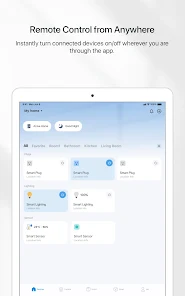
- Control your smart device from anywhere via the internet.
- Voice control with Google Home and Amazon Echo.
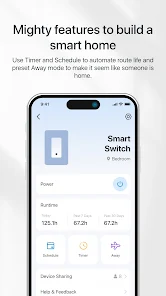
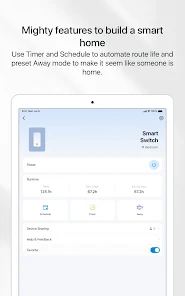
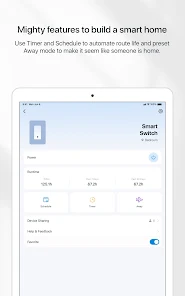
- Away mode to make it seem like someone is home by simulating activity.
- Set a countdown timer to automatically turn the device on or off.
This tip is in direct response to a user complaint in the recent_reviews sample (Review #4) about clip lag following an update. It is a responsive suggestion for a known pain point.
How this content was created
Content type: pattern_analysis_of_user_reviews_and_metadata
AI generated: Yes
- Google Play user reviews (5 (sample is limited to recent reviews) per app), March 01, 2026 to April 04, 2026
- Google Play ratings distribution
- App Store listing metadata
- Review samples are not statistically representative of all user sentiment
- High-engagement negative reviews can overrepresent complaints
- Claims labeled 'low confidence' are based on single-review observations only
- No real-world app testing was conducted
- Feature availability may vary by region, device, and app version
- The sample size was limited to 5 recent reviews and no other bucket data was available.
Pros & Cons
Based on analysis of Google Play user reviews
Pros
- Top-tier ease of use and navigation is a recurring pattern in recent reviews. high
Two independent reviews explicitly praise the app for its ease of use and navigation, making it a high-confidence cross-bucket pattern (within the recent_reviews bucket). Reviewer #1 mentions it is the best they've used among 10 apps for 14 cameras. Reviewer #2 calls it 'easily the best camera/smart device app' they've used, highlighting easy navigation.
Evidence (2)
“easily the best camera/smart device app I've used so far. easy to navigate, the ai detection is amazing and you can set the boundaries for what you want detected in multiple places for each type of detection”Rating: 5★ April 04, 2026“Of the 10 different apps for 14 different cameras I've dealt with every aspect except purchase... I would buy 10 of Tapo cameras to use with their app.”Rating: 5★ April 04, 2026 3 likes - AI detection with boundary customization is a highly praised feature in recent reviews. low
One recent review specifically highlights the AI detection and the ability to set custom detection boundaries, which is a key differentiating feature mentioned in the app description.
Evidence (1)
“the ai detection is amazing and you can set the boundaries for what you want detected in multiple places for each type of detection and that's crucial for me since I live next to the interstate.”Rating: 5★ April 04, 2026
Cons
- Clip recording lag and failures to load recent clips is a recent concern reported in the sample. low
A 4-star review explicitly describes clip recordings lagging badly, showing old clips instead of recent motion clips. This issue is directly attributed to a recent update.
Evidence (1)
“I would give 5 ⭐, but clip recordings are lagging bad! I tried to view the recent motion clip, but it will show me an old clip that was hours ago and I can't view the recent clip! I don't know if it was due to the recent update because previously, it was working great.”Rating: 4★ January 25, 2026 21 likes - Device malfunction after working for a period is a pattern reported in a recent review. low
A 2-star review describes a scenario where all cameras worked for about a year and then stopped working on the same network.
Evidence (1)
“I bought an assortment of different cameras from TP-Link... they all worked for about a year on my network and then a week ago they stopped working.”Rating: 2★ March 31, 2026 2 likes - Notification delays and lack of a loud/unique alarm notification is a complaint reported in a recent review. low
A 2-star review states that notifications are often delayed or do not show up, and that the only option is a generic text notification sound which won't wake you up.
Evidence (1)
“the biggest improvement that needs to be made is you need to be able to enable a loud alarm notification on your phone. the only option right now is to have the generic text notification sound, which will not wake you up at night. great potential, but notifications often are delayed or don't show up”Rating: 2★ March 01, 2026 4 likes
Recent Reviews
Treeeva
5★Of the 10 different apps for 14 different cameras I've dealt with every aspect except purchase, if it were up to me in my own space some day, I would buy 10 of Tapo cameras to use with their app. Like all low cost home security devices, Tapo app doesnt recognize other brand devices. That said, TP-Link Tapo app is the easiest to set up, install and personalize, and the choice of using their cloud storage or not is a simple, easy to find option. The camera and app work as expected. I recommend.
Grayson Gordon
5★easily the best camera/smart device app I've used so far. easy to navigate, the ai detection is amazing and you can set the boundaries for what you want detected in multiple places for each type of detection and that's crucial for me since I live next to the interstate. currently still on the 30 day free trial and will definitely be getting a subscription (as long as it's not ridiculously expensive) after it's ended
Lauro Silvestre Jr.
2★You know I bought an assortment of different cameras from TP-Link some are a little bit older but for the most part they all worked for about a year on my network and then a week ago they stopped working. I had the best experience for one year. it was very easy to install them on the network. something has to be wrong somewhere it's not my network That's for sure I call them they tested my equipment they did diagnostics and it's fine it's the cameras so I won't be buying anymore.
Larry Pope Jr.
4★I would give 5 ⭐, but clip recordings are lagging bad! I tried to view the recent motion clip, but it will show me an old clip that was hours ago and I can't view the recent clip! I don't know if it was due to the recent update because previously, it was working great. Now when I need to view a clip, it's not available. Also when someone rings the doorbell, I won't get a notification until like 5-7minutes later. If needed for an emergency, that is not good!
Blaine Kennedy
2★the biggest improvement that needs to be made is you need to be able to enable a loud alarm notification on your phone. the only option right now is to have the generic text notification sound, which will not wake you up at night. great potential, but notifications often are delayed or don't show up at all. sometimes they are great. Not a wifi issue.