By AppHub Editorial Team · Updated August 3, 2026

healow








Overview
Health & Fitness
eClinicalWorks LLC
Free
Mar 12, 2013
7.5.2
7.0
No
Apr 6, 2026
Features
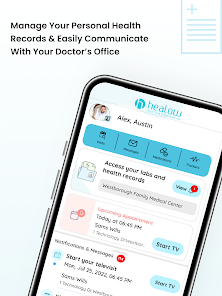
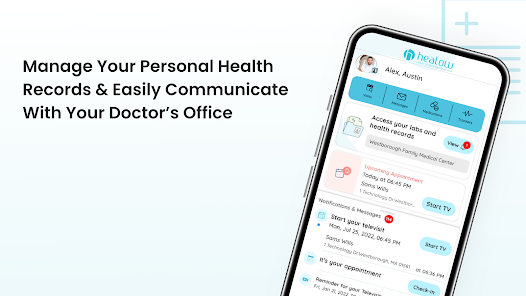
Healow App is a convenient mobile tool that helps patients access health information and communicate with their providers to stay engaged, motivated, and make healthy choices. With the healow app, patients can easily:
Message the care team – Contact care team through quick, secure direct messages. View test results – Access labs and other test results as soon as they become available. Self-schedule appointments – Book appointments with the care team and view upcoming visits beyond regular offi...
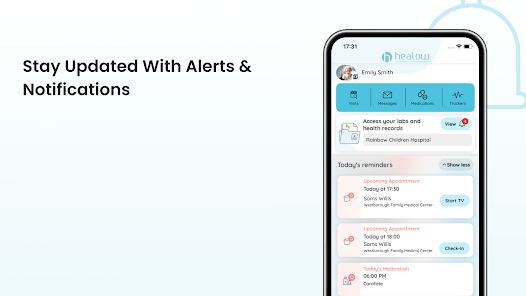
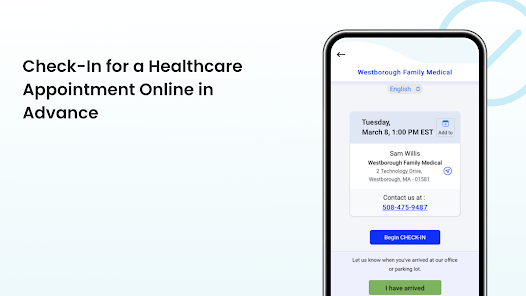
Healow App is a convenient mobile tool that helps patients access health information and communicate with their providers to stay engaged, motivated, and make healthy choices. With the healow app, patients can easily: Message the care team – Contact care team through quick, secure direct messages. View test results – Access labs and other test results as soon as they become available. Self-schedule appointments – Book appointments with the care team and view upcoming visits beyond regular office hours. Check in before the visit – Easily check in for appointments and save time by completing any necessary documentation before arrival. Attend virtual visits –Initiate and attend telehealth visits with members of the care team. View medications, set medication reminders, and request for refills without calling the doctor. View medical history including allergies, immunizations, vitals, visit summary, and other health information. Monitor vitals and meet health goals using weight management, activity, fitness, and sleeping tracking tools to track readings and watch for trend changes to share with the doctor. Manage and view multiple family member’s health records under one account. Please note that patients must have an existing healow Patient Portal account with their doctor’s office. Once downloaded and launched, the patient must log in using the username and password used to access the provider’s healow Patient Portal website to begin using the app. It will ask the user to create a pin and enable Face ID or Touch ID. Enabling either of these features will save the user from having to enter their login information every time they want to use the app. Disclosure: The Healow app utilizes the AccessibilityService API to enable multitasking features, like the floating Televisit appointment wait-time counter. No data is collected or shared using the AccessibilityService API.
Download healow
Get the official app from the trusted app stores. You will be redirected to the download page.
When you purchase through links on our site, we may earn an affiliate commission. Learn more
Ratings breakdown
218,000 reviewsDeveloper contact
Name
eClinicalWorks, LLC
Address
2 Technology Dr Westborough, MA 01581-1727 United States
Website
https://healow.comPhone
+1 774-275-1685
Support
help@healow.com
Privacy
View policyFrequently Asked Questions
Is the healow app free to download and use? high
Yes, the healow app is free to download. There are no listed in-app purchases. However, you must already have an existing patient portal account with a doctor’s office that uses the healow system to log in.
Source: app_metadata
Can I manage healthcare for my whole family in one healow account? medium
According to the app description, you can manage and view multiple family members' health records under one account. However, recent user reviews indicate that the process for adding accounts for different people (such as a child vs. a parent) can be confusing.
Source: app_metadata, user_reviews
I forgot my practice code, how do I log in on a new phone? low
A recent user review (March 2026) reports that after getting a new phone, the app requires a practice code to log in, and there is no option to simply use a username and password. You may need to contact your doctor's office to obtain the practice code for their specific healow portal.
Source: user_reviews
Can I do a video visit with my doctor using healow? high
Yes. The app description states you can attend virtual visits with members of your care team. The app also uses the AccessibilityService API for a floating telehealth appointment wait-time counter.
Source: app_metadata
What do I need before I can use the healow app? high
You need an existing healow Patient Portal account with your doctor's office. After downloading, you log in with the username and password from that portal. You will then be prompted to create a PIN and can enable Face ID or Touch ID for easier future access.
Source: app_metadata
How to Use
Healow is a mobile patient portal app for accessing health records, scheduling appointments, messaging care teams, and attending virtual visits, but it requires an existing account from a participating provider. (app_description)
Getting Started
Source: app_description_and_user_feedback_noted
- Step 1: Ensure your doctor's office uses the healow Patient Portal and that you have already registered for an account online.
- Step 2: Download and install the healow app from the Google Play Store.
- Step 3: Open the app and log in using the username and password you created for your provider's healow portal. Be prepared with your practice code, as some users report it is required instead of a simple login on a new device.
- Step 4: Follow the prompts to set up a PIN and enable biometric login (Face ID or Touch ID) for quicker access in the future.
- Step 5: If you need to add another provider or a family member, look for the 'add an account' option. Based on user feedback, you may need to re-add your own account to link a new provider, which can be confusing.
Key Features (from app listing)
Source: app_description
- Message the care team through secure direct messages.
- View test results (labs, etc.) as soon as they are available.
- Self-schedule appointments and view upcoming visits.
- Check in for appointments and complete pre-visit documentation.
- Attend telehealth/virtual visits with care team members.
- View medications, set reminders, and request refills.
- View medical history including allergies, immunizations, vitals, and visit summaries.
- Monitor vitals and health goals with weight, activity, fitness, and sleep tracking.
- Manage health records for multiple family members under one account.
This tip is responsive to a verified user complaint from recent_reviews #5 (rating 2), who stated they could not log in on a new phone because the app required a practice code they did not have.
How this content was created
Content type: pattern_analysis_of_user_reviews_and_metadata
AI generated: Yes
- Google Play user reviews (12-20 preferred; may be smaller if source data is limited per app), March 2026 to April 2026
- Google Play ratings distribution
- App Store listing metadata
- Review samples are not statistically representative of all user sentiment
- Claims labeled 'low confidence' are based on single-review observations only
- No real-world app testing was conducted
- Feature availability may vary by region, device, and app version
- The sample size of 5 reviews is very small, significantly reducing the reliability of all findings
- Only one review bucket (recent_reviews) was available, preventing cross-bucket validation
Pros & Cons
Based on analysis of Google Play user reviews
Pros
- Helpful for scheduling appointments, accessing health records, and managing payments with providers.
Theme 'Useful portal functions' identified in recent_review #1
Evidence (2)
“it does a fine job of helping with scheduling, access to some health records, payments due, and so on.”Rating: 4★ April 03, 2026 4 likes“The Healow app has been quite helpful to me and seems stable.”Rating: 4★ April 03, 2026 4 likes - Supports telehealth visits and secure messaging with the care team.
Theme 'Telehealth and messaging' identified in app description and supported by recent_review #1
Evidence (1)
“My primary care provider uses it as a patient portal, and it does a fine job of helping with scheduling, access to some health records, payments due, and so on.”Rating: 4★ April 03, 2026 4 likes - Allows managing multiple family members' health records under one account.
Theme 'Family records' identified in app description and recent_review #2
Evidence (1)
“I was confused as to where the parents info was supposed to go vs the childs.”Rating: 3★ April 03, 2026 3 likes
Cons
- Difficult to navigate and not user-friendly, especially for adding providers or managing multiple practices.
Theme 'Poor usability' identified in recent_review #2, #4, and #5
Evidence (3)
“As techy as I am this app was not easy to get started.”Rating: 3★ April 03, 2026 3 likes“it took me about 30 minutes to figure out how to add another provider.”Rating: 1★ April 07, 2026 1 likes“I have 3 different doctors using this app, tricky to go back and forth between the different practices. Not a great layout.”Rating: 2★ March 01, 2026 12 likes - Lacks basic features like a help function, search for providers, and ability to attach photos to messages.
Theme 'Missing features' identified in recent_review #2, #3, and #4
Evidence (3)
“PLEASE ADD A HELP FUNCTION!”Rating: 1★ April 07, 2026 1 likes“there is no sign of any search functions for locations or providers.”Rating: 1★ March 07, 2026 10 likes“You can't attach docs or photos to messages.”Rating: 3★ April 03, 2026 3 likes - Login process is cumbersome, often requiring a practice code that users may not have.
Theme 'Login issues' identified in recent_review #5
Evidence (2)
“When you get a new phone and download app, nowhere to simply log in with username and password. Wants practice code which I don't have since I've been using it for years”Rating: 2★ March 01, 2026 12 likes“I saw the add an account link but that was to add another person. I didn't know that you had to add yourself twice in order to add a provider.”Rating: 1★ April 07, 2026 1 likes
Recent Reviews
Matthew Pursley
4★The Healow app has been quite helpful to me and seems stable. My primary care provider uses it as a patient portal, and it does a fine job of helping with scheduling, access to some health records, payments due, and so on. The interface was a bit tricky for me at first, but worth exploring. Some functions and info are much easier to access using the website.
Keya Cooper
3★I've definitely used better medical apps. This app is just ok... As techy as I am this app was not easy to get started. I was confused as to where the parents info was supposed to go vs the childs. I really wish I was able to update the health insurance within the app. You can't attach docs or photos to messages. I wanted to attach a photo of my insurance card instead of just giving the info in the measage. Techs could really learn a thing or 2 from the Mychart app. I guess I'll get used to it.
Charles B
1★I rarely give this negative rating for anything. Despite starting out seemingly okay, there is no sign of any search functions for locations or providers. There are extremely log lists for both. There appear to be many questionable locations where the locations and addresses are followed by the wrong state names. The practitioner list seems better in that it is alphabetical by first name. However, even if one successfully finds the location or practitioner, neither can be selected!
BIG BRYAN'S BIG ADVENTURE
1★PLEASE ADD A HELP FUNCTION! it took me about 30 minutes to figure out how to add another provider. I saw the add an account link but that was to add another person. I didn't know that you had to add yourself twice in order to add a provider. frankly, it's a ridiculous way to do it. It is not a very user-friendly app.
Sharklette 555
2★Just OK. I have 3 different doctors using this app, tricky to go back and forth between the different practices. Not a great layout. When you get a new phone and download app, nowhere to simply log in with username and password. Wants practice code which I don't have since I've been using it for years or search for practice, which it cannot find correct location. Had to use a Miami location for a Plantation practice because my doctors name was in the list so now wrong address shows. Not a fan.