By App Discoverer Editorial Team · Updated October 1, 2026

Google Translate

Overview
Tools
Google LLC
Free
No
Features
Download Google Translate
Get the official app from the trusted app stores. You will be redirected to the download page.
When you purchase through links on our site, we may earn an affiliate commission. Learn more
Ratings breakdown
9,060,000 reviewsData Safety
- No data shared with third parties Learn more about how developers declare sharing
- This app may collect these data types Location, Personal info and 5 others
- Data is encrypted in transit
- You can request that data be deleted
- Independent security review
Developer contact
Name
Google LLC
Address
1600 Amphitheatre Pkwy Mountain View, CA 94043 United States
Phone
+1 650-253-0000
Support
translate-mobile-support@google.com
Privacy
View policyFrequently Asked Questions
Is Google Translate free to download? high
Yes. The app metadata lists Google Translate as free.
Source: app_metadata
What do sampled users complain about in Google Translate? low
Google Translate has sampled reports that recent updates made the experience worse or introduced new problems. Only 1 sampled review supports this theme, so confidence is low. For example, one reviewer says: "It worked up until 2/4. I don't understand why the latest update messed things up. It worked so well before. It caught 9"
Source: user_reviews
What do sampled users like about Google Translate? low
Google Translate is praised by sampled reviewers for its features, functionality, or customization options. Only 1 sampled review supports this theme, so confidence is low.
Source: user_reviews
Is Google Translate worth downloading in 2026? medium
Based on 5 sampled reviews spanning December 03, 2025 to February 11, 2026, Google Translate has a 4.3/5 overall rating from 9.1M total reviews. Sampled reviews show 1 praised themes and 2 complaint themes. As with any app, experiences vary by device and use case.
Source: user_reviews, app_metadata, ratings_data
How to Use
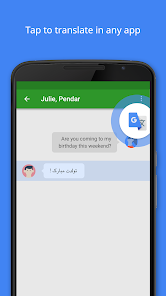
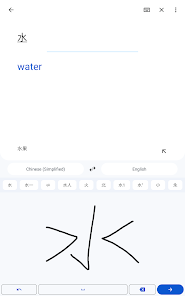
• Text translation: Translate between 108 languages by typing• Tap to Translate: Copy text in any app and tap the Google Translate icon to translate (all languages)• Offline: Translate with no interne (app_description)
Getting Started
Source: app_description_and_user_feedback_noted
- Install Google Translate from the Google Play Store or Apple App Store.
- Open the app and begin with the free experience to explore its core functionality.
- Review the main features described in the app listing to understand what this app offers.
- Be aware of sampled user-reported issues: the app has sampled reports that recent updates made the experience worse or introduced new problems..
Key Features (from app listing)
Source: app_description
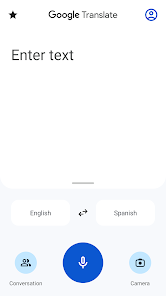
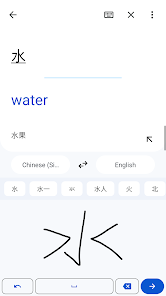
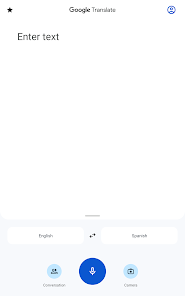
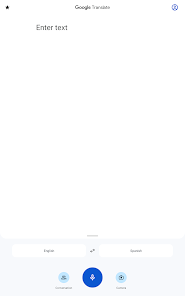
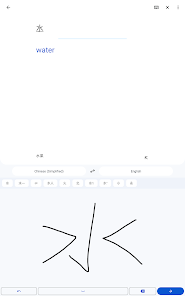
- Text translation: Translate between 108 languages by typing
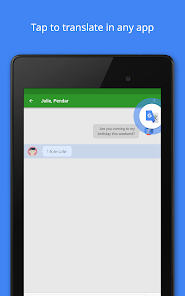
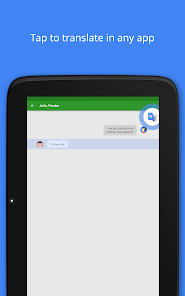
- Tap to Translate: Copy text in any app and tap the Google Translate icon to translate (all languages)
- Offline: Translate with no internet connection (59 languages)
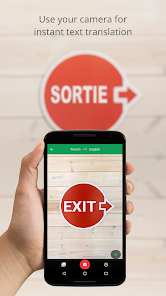
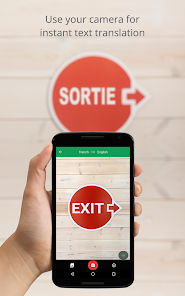
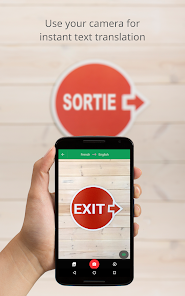
- Instant camera translation: Translate text in images instantly by just pointing your camera (94 languages)
- Photos: Take or import photos for higher quality translations (90 languages)
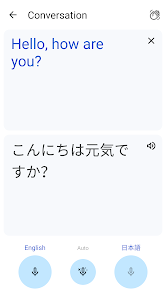
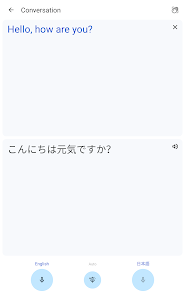
- Conversations: Translate bilingual conversations on the fly (70 languages)
Theme 'features, functionality, or customization options' identified in recent_reviews #2. Review #2 (recent_reviews, 4★) mentions features, functionality, or customization options.
How this content was created
Content type: pattern_analysis_of_user_reviews_and_metadata
AI generated: Yes
- Google Play user reviews (12-20 preferred; may be smaller if source data is limited per app), December 03, 2025 to February 11, 2026
- Google Play ratings distribution
- App Store listing metadata
- Review samples are not statistically representative of all user sentiment
- High-engagement negative reviews can overrepresent complaints
- Claims labeled 'low confidence' are based on single-review observations only
- No real-world app testing was conducted
- Feature availability may vary by region, device, and app version
Pros & Cons
Based on analysis of Google Play user reviews
Pros
- Supports translation between 108 languages with multiple input methods including text, voice, and camera.
Theme 'Multi-language support' identified in app description
Evidence (1)
“Text translation: Translate between 108 languages by typing”Rating: 5★ N/A - Free to use with no ads, making it accessible for quick translations.
Theme 'Free and ad-free' identified in recent_review #5
Evidence (1)
“At least, there were no ads.”Rating: 1★ December 03, 2025 28 likes - Offline translation available for 59 languages, useful without internet access.
Theme 'Offline translation' identified in app description
Evidence (1)
“Offline: Translate with no internet connection (59 languages)”Rating: 5★ N/A
Cons
- Voice translation stops mid-sentence if you pause or take a breath, losing all progress.
Theme 'Voice translation interruption' identified in recent_review #3
Evidence (1)
“if you are attempting to translate a thought and take a breath, it stops. if you for any reason stop translating via voice for less than a second, it stops.”Rating: 2★ October 10, 2025 205 likes - Recent updates have severely degraded real-time translation accuracy and speed.
Theme 'Accuracy decline after update' identified in recent_review #1
Evidence (1)
“It worked up until 2/4. I don't understand why the latest update messed things up. It worked so well before. It caught 95% of what needed to be translated and translated instantly in real time. Now it'll only catch like 5%.”Rating: 1★ February 11, 2026 89 likes - No adjustable playback speed for translated audio, making listening to long translations tedious.
Theme 'No audio speed control' identified in recent_review #4
Evidence (1)
“But the playback voice speaks really slow and there’s no way to speed it up (or slow it down if needed). It would be great if there was an option to change the playback speed for translated audio”Rating: 3★ November 18, 2025 140 likes
Recent Reviews
Tanis Biga
1★It worked up until 2/4. I don't understand why the latest update messed things up. It worked so well before. It caught 95% of what needed to be translated and translated instantly in real time. Now it'll only catch like 5%. Not exaggerating. And it takes so long to translate. Showing multiple translations until it chooses which to give. And sometimes while it's thinking, it won't translate and just delete what it just picked up. Doesn't translate any songs anymore. It was perfect before.
Danny Unger
4★The app is amazing for what it can do with languages! The UI could use some tweaks, tho. One huge feature I'd like to see is if Translate can keep media volume at high level -- while the app is open and translating -- and then go back to previous volume setting. I'm constantly having to remember to reduce volume after using translate. Also, along those lines, I think if Translate is open, the audio should come thru the phone during the active session, not, say, your car via Bluetooth.
Randall Baker
2★maybe 70% accurate, and good for only a quick sentence, beyond that it has difficulty if you use voice translate. For example if you are attempting to translate a thought and take a breath, it stops. if you for any reason stop translating via voice for less than a second, it stops. No way to continue, you simply lose what you have done and start over. In conversation, mediocre, misses many words, app gets locked up, just not something to depend upon.
Keith
3★Here's a new edited version of my feedback request. When I translate long paragraphs for my wife, she likes to listen to the translation instead of reading it. But the playback voice speaks really slow and there’s no way to speed it up (or slow it down if needed). It would be great if there was an option to change the playback speed for translated audio with a simple faster/slower slider. Thank you.
Steffi Kaizun (Skaizun)
1★I installed this to translate a Japanese news network that doesn't have English captions. I was confused by the choice of "conversation" vs "voice", tried both, and all it did was show one block of original and translated text, which was only about 20% accurate (tested on a Japanese program having English subtitles). I couldn't figure out how to do real-time translating, so it was uninstalled. At least, there were no ads.