By AppHub Editorial Team · Updated August 3, 2026

Google Play Books & Audiobooks


Overview
Books & Reference
Google LLC
Free
Dec 6, 2010
$0.01 - $1,200.00 per item
No
In-App Purchases
Feb 16, 2026
Features
Dive into a world of stories with Google Play Books! Explore millions of ebooks, audiobooks, comics, and manga — all in one app.
Key Features:
Dive into a world of stories with Google Play Books! Explore millions of ebooks, audiobooks, comics, and manga — all in one app. Key Features:
Download Google Play Books & Audiobooks
Get the official app from the trusted app stores. You will be redirected to the download page.
When you purchase through links on our site, we may earn an affiliate commission. Learn more
Ratings breakdown
3,070,000 reviewsData Safety
- No data shared with third parties Learn more about how developers declare sharing
- This app may collect these data types Personal info, Financial info and 5 others
- Data is encrypted in transit
- You can request that data be deleted
- Independent security review
Permissions
- find accounts on the device
- add or remove accounts
- find accounts on the device
- read the contents of your USB storage
- modify or delete the contents of your USB storage
- read the contents of your USB storage
- modify or delete the contents of your USB storage
- record audio
- view network connections
- measure app storage space
- full network access
- read sync settings
Developer contact
Name
Google LLC
Address
1600 Amphitheatre Pkwy Mountain View, CA 94043 United States
Website
http://play.google.com/Phone
+1 650-253-0000
Support
googleplay-support@google.com
Privacy
View policyFrequently Asked Questions
Is Google Play Books free to use? high
Yes, the app itself is free to download and use. However, purchasing ebooks, audiobooks, comics, or manga incurs costs, with in-app purchases ranging from $0.01 to $1,200.00 per item.
Source: app_metadata
Can I read books offline with Google Play Books? high
Yes. According to the app description, you can download books to read offline on your phone, tablet, or computer.
Source: app_metadata
Does Google Play Books support highlighting text across multiple pages? low
According to user feedback in a recent 3-star review, the app does not support highlighting text on multiple pages — a feature that competitors like Kindle offer.
Source: user_reviews
How to Use
Google Play Books is a free app for discovering, purchasing, and reading millions of ebooks, audiobooks, comics, and manga across devices. (app_description)
Getting Started
Source: app_description
- Download the Google Play Books app from the Google Play Store.
- Sign in with your Google account.
- Browse or search for ebooks, audiobooks, comics, or manga.
- Preview books by sampling before purchasing.
- Purchase or download free books to your library for offline reading.
Key Features (from app listing)
Source: app_description
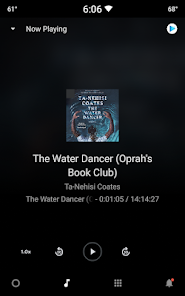
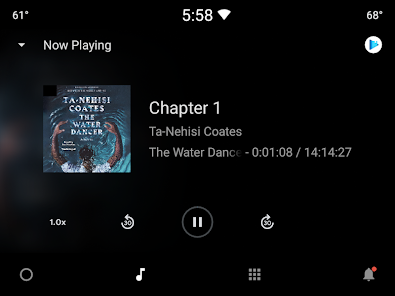
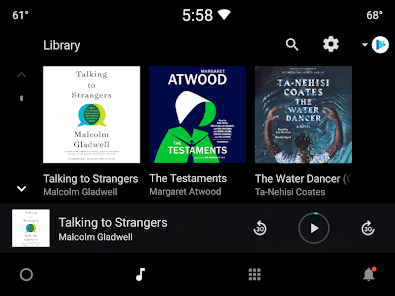
- Read across devices (phone, tablet, computer, Android Auto) with downloads for offline reading.
- Earn Google Play Points on book purchases (availability varies by country).
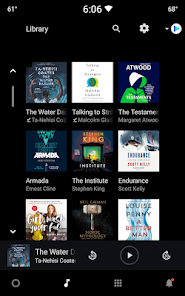
- Organize your library with custom shelves.
- Take smart notes that sync with Google Drive.
- No subscription required — buy books individually.
- Kid-friendly reading tools: word definitions and read-aloud (English only).
- Immersive comic and manga reading with Bubble Zoom.
- Voice control for audiobooks via Google Assistant.
- Customizable reading experience (font, text size, brightness, and more).
Derived from a user complaint in recent reviews (review_id 3) about persistent pop-ups for price drops even after disabling 'For You' notifications.
How this content was created
Content type: pattern_analysis_of_user_reviews_and_metadata
AI generated: Yes
- Google Play user reviews (12-20 preferred; may be smaller if source data is limited per app), November 13, 2018 to November 21, 2024
- Google Play ratings distribution
- App Store listing metadata
- Review samples are not statistically representative of all user sentiment
- High-engagement negative reviews can overrepresent complaints
- Claims labeled 'low confidence' are based on single-review observations only
- No real-world app testing was conducted
- Feature availability may vary by region, device, and app version
- Only 5 recent reviews were available; no liked_negative_reviews, liked_positive_reviews, or mixed_reviews were provided
Pros & Cons
Based on analysis of Google Play user reviews
Pros
- The app provides a reliable core reading experience that many users find satisfactory. medium
Theme 'basic functionality works well' identified in 2 recent_reviews: review_id 1 mentions it works for basic reading, review_id 4 says it does what it's supposed to without issues most of the time.
Evidence (2)
“It works well for the most basic of use cases: reading.”Rating: 3★ November 13, 2018 1,159 likes“Does what it's supposed to do without issues most of the time.”Rating: 5★ May 17, 2024 4,301 likes - The app is praised for its simple, easy-to-understand interface. low
Theme 'easy interface' identified in 1 recent review (review_id 2) that explicitly says 'Its interface is easy to understand.' The same review also notes it's a 'great digital book library edition for any reader on any device.'
Evidence (1)
“Google Play Books to me, is a great digital book, library edition for any reader on any device. Its interface is easy to understand.”Rating: 5★ August 16, 2024 6,457 likes
Cons
- The app lacks advanced reading features such as the ability to highlight text across multiple pages, which competitors like Kindle offer. low
Theme 'missing highlighting feature' identified in 1 recent review (review_id 1). User compares to Kindle and smaller apps, calling the feature set 'very bare-bo'.
Evidence (1)
“For instance, if you want to highlight text on multiple pages... nope! can't do that! Compare this to what Kindle app offers, or even some of the smaller apps offers, it's very bare-bo”Rating: 3★ November 13, 2018 1,159 likes - Users cannot manually sort books within custom shelves, which is a usability limitation. low
Theme 'no manual sorting in shelves' identified in 1 recent review (review_id 3). User explicitly states 'you can't manually sort books that are in a Shelf.'
Evidence (1)
“I only have two problems with it; one, you can't manually sort books that are in a Shelf.”Rating: 5★ November 21, 2024 3,799 likes - Unwanted pop-up notifications about price drops occur even when the user has disabled 'For You' notifications. low
Theme 'persistent pop-up notifications' identified in 1 recent review (review_id 3). User says 'even though I have the "For You" notifications off, I still keep getting popups for price drops on books I don't want.'
Evidence (1)
“And two, even though I have the "For You" notifications off, I still keep getting popups for price drops on books I don't want.”Rating: 5★ November 21, 2024 3,799 likes - A file upload error message appears persistently, with no available fix, forcing some users to switch to alternative apps. low
Theme 'upload error' identified in 1 recent review (review_id 5). User describes constant error 'This file couldn't be uploaded' and states they migrated to another app because no online fix found.
Evidence (1)
“I continually get a "This file couldn't be uploaded. Check your internet connection and try again." error trying to upload a book. I can't find any info online how to fix it, so I have migrated to another app.”Rating: 2★ January 12, 2023 361 likes
Recent Reviews
A Google user
3★It works well for the most basic of use cases: reading. But it lacks a lot of features that other reader apps have. For instance, if you want to highlight text on multiple pages... nope! can't do that! Compare this to what Kindle app offers, or even some of the smaller apps offers, it's very bare-bones. At least the book prices are somewhat competitive!! And syncing books and progress across multiple devices works well.
William Darnell Sr. (GrandpaSwagger_FrenchFrys)
5★Google Play Books to me, is a great digital book, library edition for any reader on any device. Its interface is easy to understand. However, it can be challenging for some who may suffer from certain brain conditions. The outside looks have a brand emblem that's crisp in colors. Now, I have to be candid, but I have bought some of my fav authors' books, samples, etc. But honestly, I don't like to read and I'm a writer, published. Yikes, I said that out loud! 🙊 Great Book Library, Google. 💯
PurpleGermanShepherd13
5★This app is a good place to keep and read my ebooks. I only have two problems with it; one, you can't manually sort books that are in a Shelf. And two, even though I have the "For You" notifications off, I still keep getting popups for price drops on books I don't want. Not going to be a crybaby bigot over it like some people, though. However, these few issues are not that big of a deal, so I gave the app five stars.
Derrick K.
5★Does what it's supposed to do without issues most of the time. I never really used it to buy anything, but their books are fairly priced, possibly less than a physical copy in some cases. I prefer either going to the library or buying a physical copy at bargain prices, but whenever I want an e-book, this is 1 of the first places I look. Definitely can give Kindle a run for its money, but it depends on your preference & all. Excellent overall... 👍🏻😍
Kerrie
2★Great, until it stopped functioning. I continually get a "This file couldn't be uploaded. Check your internet connection and try again." error trying to upload a book. I can't find any info online how to fix it, so I have migrated to another app. I don't want to delete and reinstall because I have too many books on here and don't want to have to reload everything. You'd think Google could fix this kind of thing.